

Table of Contents
Table of Contents
Most SERP API free trials hand you just enough rope to confirm something works, never enough to find out where it breaks.
SERPHouse does this differently. Create a free account and you get 4,000 credits: enough to run a structured, multi-dimensional evaluation against your actual workload before you spend a dollar on a paid plan.
Quick Take: What this guide covers
- What a SERP API free trial is actually for
- A credit-allocation framework (Phase 1 through Reserve)
- A day-by-day, 7-day testing workflow
- The questions to ask before you upgrade
- The mistakes that quietly waste most trial budgets
The gap between a 100-query trial and a 4,000-credit one isn’t just volume. It’s the difference between confirming a response and understanding whether the API holds up in production. Here’s how to spend those credits so you walk away with a decision, not an impression.
What Is a SERP API Free Trial, Really?
A SERP API free trial exists so developers and SEO teams can test accuracy, speed, and reliability before committing to a paid subscription. It’s a deal-breaker detector, not a sales demo.
A trial worth running should let you test:
- Response speed under realistic, not idealized, conditions
- Data accuracy against manual, human verification
- Geographic targeting for the markets you actually serve
- Mobile vs. desktop result differences
- Error handling and reliability signals
- Whether the JSON schema fits your existing integration
Google’s own documentation describes search results as the product of crawling, indexing, and serving stages and the resulting SERP contains organic links, featured snippets, local packs, image carousels, People Also Ask boxes, shopping results, and more. A useful free-trial evaluation checks that the API returns all of the result types your workflow depends on, not just the 10 blue links that make a five-minute demo look clean.
Reality Check
Most teams test 10 keywords, on desktop, in the US, see clean JSON, and call it done.
That’s not wrong; it’s just too narrow to mean anything. The queries that look great in a demo are the easiest ones for any provider to serve well. They’re also the least representative of what a real production workload looks like.
Why Most SERP API Free Trials Don’t Tell You What Matters
The failure pattern is almost always identical: same keyword, same location, same device, ten times in a row. Clean JSON comes back. Box checked.
Here’s what that approach can’t see:
| Blind spot | Why it matters |
| Geographic variation | Is the location parameter changing results, or just relabeling the same result set? |
| Device-type divergence | Mobile and desktop rankings have genuinely diverged for a large share of queries since mobile-first indexing |
| SERP feature accuracy | Featured snippets, local packs, and PAA boxes need to be parsed correctly, not just acknowledged |
| Failure behavior | Malformed requests, rate limits, and timeouts are invisible until a production system hits one |
| Concurrent performance | An API that’s smooth at 1 request/second may not be smooth at 50 |
Four thousand credits is enough to close every one of these gaps, but only if you spend them on purpose.
How to Allocate SERPHouse’s 4,000 Free Credits
Before you run a single query, answer five questions:
- What keyword types do you actually track: branded, local, long-tail, transactional, navigational?
- Which geographic markets matter to your use case?
- Do your workflows need mobile results, desktop results, or both?
- Which SERP features does your downstream system need to parse?
- What’s your expected production query volume per day?
Your answers shift the allocation below. A local SEO agency should weight geographic testing more heavily. A SaaS rank-tracker team should weight device and concurrency testing. An e-commerce team should weight SERP feature accuracy.
Quick Take: The Default Allocation
| Phase | Credits | Focus |
| 1. Baseline accuracy | 500 | Core keywords, desktop, US, manual cross-check |
| 2. Geographic targeting | 800 | Same queries across cities and countries |
| 3. Device-level testing | 600 | Mobile vs. desktop on the same keyword set |
| 4. SERP feature accuracy | 500 | Featured snippets, PAA, local packs |
| 5. Concurrency & errors | 400 | Concurrent load, malformed input, rate limits |
| 6. Workflow simulation | 700 | Your actual production query pattern at trial scale |
| Reserve | 500 | Re-testing anomalies, edge cases, open questions |
This turns 4,000 credits from a marketing number into a structured engineering evaluation. If you want a deeper read on how SERPHouse’s credit system maps to individual requests before you start spending, SERPHouse’s guide to how API credits work breaks down the conversion rate by endpoint.
What to Actually Test During the Trial
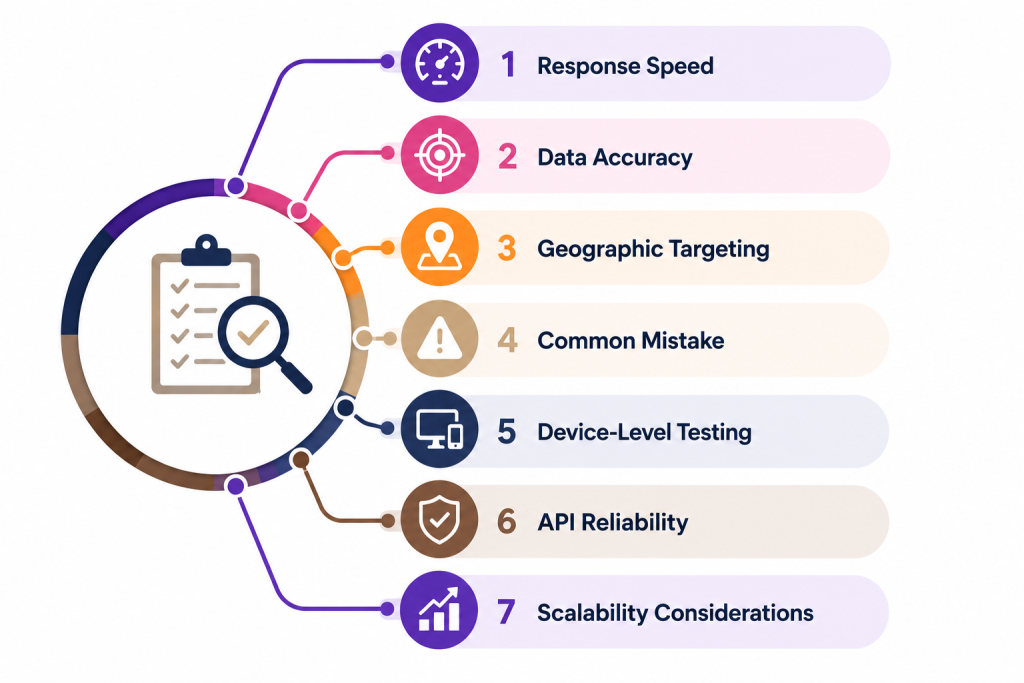
Response Speed
Latency decides whether a real-time SERP API fits your workflow and it’s the dimension most distorted by the gap between demo conditions and production conditions.
For sequential batch jobs (daily rank tracking), two to four seconds per query is generally fine. For anything that returns data in response to a live user action a dashboard, a competitive-monitoring tool latency matters far more.
How to measure:
- Run 10 sequential requests for one query. Record each response time. Flag anything over 5 seconds.
- Send 10 concurrent requests. If average latency doubles or triples, that’s an early warning sign for scale.
- Compare latency across geographic targets a query routed to Europe shouldn’t take materially longer than the same query targeting the US.
Pro Tip: Document every number. “It felt fast” is not a finding.
Data Accuracy
Speed problems are visible immediately. Accuracy problems are invisible until they’ve already shaped a decision.
- Cross-reference test: Pick 20–30 keywords across industries and intents. Run them through the API, then manually check the top five organic results in an incognito window with matching location settings. Minor personalization drift is normal; structural disagreement on top-ranking domains is a red flag.
- SERP feature verification: Pick 15 keywords where you’ve manually confirmed a featured snippet, local pack, PAA box, or shopping carousel. Confirm the API identifies and returns the same feature.
- Freshness test: Query a page you know recently changed rank. A live result should reflect that change. A real-time SERP API that quietly serves a cached snapshot is dangerous for any time-sensitive monitoring use case.
- Long-tail accuracy: Featured-snippet wins and ranking breakthroughs happen in long-tail territory first. Test there, not just on head terms some providers tune infrastructure around high-volume queries at the expense of everything else.
Geographic Targeting
This is the most common silent failure in SERP API evaluations: location parameters are accepted without error, the response comes back fast, the data looks plausible, but it’s nearly identical across locations because the geo-targeting is cosmetic.
City-level validation: Run a clearly local-intent query (“emergency plumber,” “best dentist”) across five cities Chicago, Houston, Miami, Seattle, Boston. If the top-ranked domains are identical across all five, geo-targeting isn’t functioning.
Country-level validation: Run the same query targeting the US, UK, Canada, and Australia. Results should reflect each country’s distinct index, not a US-centric default.
Language alignment: For non-English markets, confirm result language matches the target locale.
This is exactly the kind of failure that SERP APIs built for local SEO are designed to prevent. Granular location targeting only has value if it’s verified, not assumed. Spend the full Phase budget here if any part of your workflow touches local results.
Common Mistake
Testing geo-targeting from a single location and assuming it works everywhere. It’s the single most common gap in trial evaluations and the easiest one to close.
Device-Level Testing
Mobile and desktop rankings have genuinely diverged for a meaningful share of the query landscape, particularly in e-commerce, local services, and content publishing. An API that ignores the device parameter or accepts it but returns identical results is giving you an incomplete picture.
How to test: Run your 20–30 core keywords on both device settings. For any query where manual verification shows a real ranking difference, confirm the API reflects it. Spend roughly 600 credits here; a small price against the risk of shipping a rank tracker that silently misreports mobile visibility.
API Reliability
Reliability is hard to test in a short trial because failures are low-probability events. You can’t observe a year of uptime in a week. But you can test the behavior that predicts reliability:
- Error structure: Send malformed requests, bad location code, missing parameter, malformed query string. A production-ready API returns a clear, documented status code and message, not a silent 200 with empty data.
- Rate limit behavior: Deliberately hit your trial’s rate limit. Look for a clean 429 with a Retry-After header. Understanding how API rate limits actually work before you build retry logic against them will save real debugging time later.
- Timeout handling: Send a query likely to produce a complex response and confirm timeouts occur cleanly within the documented window.
- Status page existence: Does the provider publish historical uptime? A provider that documents its own outages is more trustworthy than one that doesn’t.
Scalability Considerations
A free trial is, by definition, low-volume. The 4,000 credits won’t replicate production scale but they give you a meaningful signal about what happens when volume increases.
- Concurrency at trial scale: If production means 200 concurrent requests, test 20 (10% of target). If latency doubles and error rate climbs past 2% at 10% of volume, expect worse at full scale.
- Rate-limit math: Divide your expected daily volume by the rate limit at each pricing tier. Some published plans cap daily throughput below what the sticker price implies.
- Cost-per-query: A plan that looks cheap on the pricing page can be expensive per query at your real volume, and vice versa.
A 7-Day Workflow for Spending 4,000 Credits
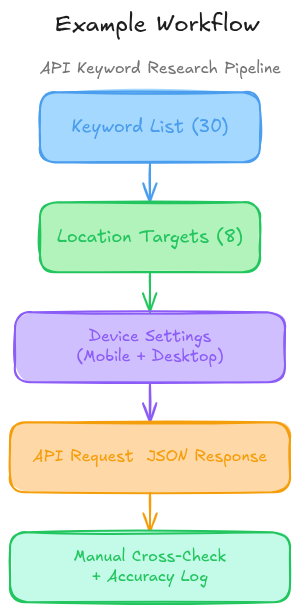
Day 1 Setup and Baseline (500 credits): Read the API documentation before spending a single credit; fifteen minutes here saves credits later. Build a 30-keyword list: 5–10 head terms, 10–15 long-tail variants, 5 local-intent queries, 5 SERP-feature targets. Run all 30 on desktop, US, Google. Manually verify 10 of the 30.
Day 2 Geographic Targeting (800 credits): Run your 5 local-intent queries across 8 locations (4 US cities, 4 international markets relevant to you). Run 10 general keywords across 5 US states and 3 countries. Flag any market suspiciously similar to US results.
Day 3 Device-Level Testing (600 credits): Run the full 30-keyword list on mobile. Compare against Day 1 desktop results. If results are identical across every query regardless of device, contact support before continuing.
Day 4 SERP Features and Long-Tail (500 credits): Verify your 5 feature-target queries return the correct feature type and content. Add 20 long-tail variants (4+ words) and check accuracy on 5 of them.
Day 5 Concurrency and Errors (400 credits) Run 50 concurrent requests and compare latency/error rate to your Day 1 baseline. Send 5 deliberately malformed requests. Hit your rate limit on purpose and document the response.
Day 6 Workflow Simulation (700 credits) Reproduce your actual production pattern at reduced scale, same stagger, same timing, smaller volume. This is where queue delays and intermittent spikes show up that point-in-time tests miss.
Day 7 Edge Cases and Reserve (500 credits) Re-test any anomalies. Try query types outside your original plan: news, image, autocomplete if relevant to your use case. Ask support your remaining questions and fold the answers into your decision.
Questions to Ask Before You Upgrade
The trial gives you leverage that disappears the moment you subscribe.
✓ What’s the uptime SLA, and what happens if it’s missed?
✓ What happens when I exceed my monthly limit errors, or silent overage billing?
✓ How fast does support respond, and through what channel?
✓ How much notice is given before breaking API changes?
✓ Is infrastructure shared, or reserved at higher tiers?
✓ Is there a difference between cached and live query modes, and is it disclosed?
A confident, specific answer to each signals a provider built for production use. A redirect to marketing copy signals the opposite. If you’re still comparing options at this stage, a side-by-side look at SERP API providers for rank tracking is a useful gut-check before you commit.
Common SERP API Evaluation Mistakes
- Testing only the happy path: Spend at least 10% of your credits deliberately trying to break the API.
- Using only head terms: They’re the easiest queries for any provider to get right and the least representative of your real workload.
- Skipping geographic validation: Invisible from a single location, costly in production.
- Ignoring integration effort: A slightly-less-accurate API with a clean, documented schema can cost less engineering time than a “better” one with an inconsistent response format.
- Judging cost on sticker price alone: Cost-per-query at your actual volume is the number that matters.
- Skipping the documentation: Documentation quality during the trial predicts support quality after you subscribe.
These are the same patterns covered in more depth in SERPHouse’s breakdown of common SERP tracking challenges, worth a look if any of these feel familiar from a past integration.
If you’ve made it this far, you already know more about evaluating a SERP API than most people do before they subscribe to one. Start a free SERPHouse account and run Day 1 of the workflow above today, no card required.
Why SERPHouse Holds Up Under This Kind of Scrutiny
Real-time data: SERPHouse returns live results, not cached snapshots, a meaningful advantage for rank monitoring and SERP feature tracking, where freshness is the whole point.
City-level geographic targeting: Location support extends to city granularity, not just country-level routing, the level of precision local SEO and localized rank-tracking workflows actually need.
Device-type support: Mobile and desktop queries return genuinely distinct result sets, reflecting how Google’s mobile-first index actually behaves.
Structured, documented JSON: A consistent schema across organic results and SERP features reduces integration time. See SERPHouse’s API documentation for the full endpoint reference.
Support that answers during the trial, not after: Questions get answered while you’re still deciding, which is when the answers actually matter.
If your use case is agency-scale multiple clients, multiple markets, both device types, SERPHouse’s breakdown of how agencies track keywords at scale shows what that looks like in practice. If you’re building your own tracking product on top of the API, the guide to building a custom rank tracker with SERPHouse is the more relevant next read.
Want the shorter version of “Is a free SERP API good enough for me”? SERPHouse’s guide to judging a free SERP API the right way covers the same evaluation logic in a faster format.