Google Workspace Marketplace App

Keyword Rank Tracker for Google Sheets

Monitor keyword positions, ranked URLs, and full ranking history across locations, devices, and languages. All inside your spreadsheet. No extra dashboards. No CSV exports. Powered by the SERPHouse API.

50M+

API requests served

99.9%

Uptime SLA

100+

Countries supported

<5s

Median response time

Trusted by companies worldwide

DHL Shopify Mastercard Hotstar Royalty Range TCS The World Bank

Capabilities

Everything you need to track rankings in Google Sheets™

One add-on. One SERPHouse API connection. Complete keyword rank tracking: automated, scheduled, and built into the spreadsheet your team already uses.

In-Spreadsheet Rank Tracking

Track all your keywords without leaving Google Sheets™. No dashboards, no CSV exports, no extra tools. Everything lives in the sheet your team already uses.

Full Ranking History & Trends

Every check appends a new row. Build charts, spot rank drops, and compare positions over time using native Google Sheets features.

Ranked URLs Stored Per Check

See the exact URL ranking for each keyword, not just a position number. Enables page-level analysis, cannibalization detection, and competitor URL monitoring.

Multi-Location & Device Targeting

Configure each keyword by country, city, language, and device. Track the same keyword across multiple markets simultaneously from a single sheet.

Automated Scheduling

Set daily, weekly, or custom schedules from the sidebar. Checks run automatically, even when the spreadsheet is closed.

Credit Transparency

See your live credit balance and estimated cost before each run. No surprise charges. Pay only for what you actually use.

How It Works

Up and running in under 5 minutes

1

Install from Google Workspace Marketplace

Search "Keyword Rank Tracker by SERPHouse" and click Install. Available under Extensions in any Google Sheet.

2

Connect your SERPHouse API key

Open the sidebar, paste your API key, and you're ready. Free to sign up, no credit card required.

3

Add keywords and set location & device

Enter keywords, target domain, location, and device per row. Each keyword can target a different market.

4

Run now or schedule automatically

Hit Run Now for instant results, or configure a daily or weekly schedule. Rankings populate your sheet automatically.

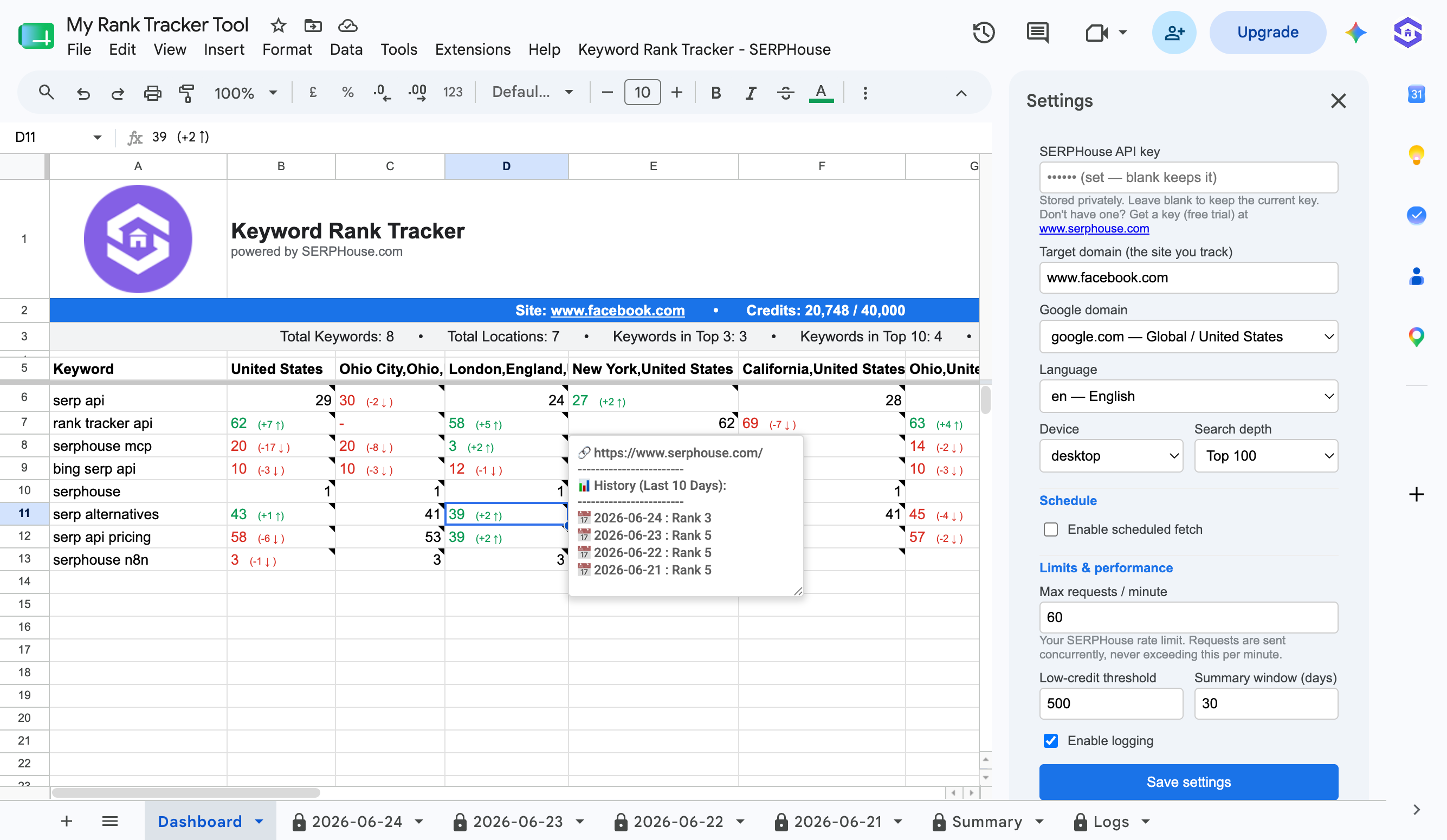
My Rank Tracker Tool · Google Sheets
Keyword Rank Tracker add-on in Google Sheets showing multi-location rankings, settings sidebar, and rank history tooltip

Why SERPHouse

Rank tracking that lives where your team already works

Your rankings, in the spreadsheet your team already uses. No proprietary dashboards, no lock-in. Just data you own.

check

Lives inside Google Sheets with no new tools to learn

check

Stores the ranked URL per check, not just the position

check

100+ countries with city-level and device targeting

check

Runs on a schedule with no manual checks needed

check

Free to install; pay only for the credits you use

SEO Freelancers

Track client keywords without a monthly SaaS subscription. Own your data, share the sheet, and deliver reports at a fraction of the cost.

Marketing Teams

One shared sheet, automatically updated. Everyone on the team starts the day with current rankings. No manual checks, no chasing data.

Digital Agencies

One sheet per client, location and device configured per keyword. Let the add-on run on schedule while your team focuses on strategy.

FAQ

Frequently asked questions

Everything you need to know before installing the Keyword Rank Tracker from Google Workspace Marketplace.

Install it from the Google Workspace Marketplace, connect your SERPHouse API key, and enter keywords directly in your sheet. The add-on fetches live Google rankings and writes position, ranked URL, and check date back into your spreadsheet, either on demand or on a schedule.

Yes, the add-on uses the SERPHouse API to fetch live rankings so an API key is required. Sign up free at serphouse.com, no credit card needed.

Open the sidebar, go to Scheduling, and pick daily, weekly, or a custom interval. Checks run via Google Apps Script triggers with no manual action needed, even when the sheet is closed.

Yes, 100+ countries with city-level precision. Set location, language, and device per keyword directly in your sheet to track the same keyword across multiple markets from one spreadsheet.

Each check records the keyword, position, ranked URL, check timestamp, and location/device config. Everything is written directly into your sheet and you own it permanently.

Yes, you can set the device per keyword row. Google serves different rankings on mobile and desktop, so tracking both gives you an accurate picture of your full visibility.

Free to install. Each rank check uses one SERPHouse API credit. A free trial is available so you can test the full workflow before upgrading.

Rankings are fetched in real time from live Google results, unfiltered, for the exact location and device you specify. SERPHouse maintains a 99.9% uptime SLA with sub-second response times.

Start tracking keyword rankings in your Google Sheet today

Free to install. No extra dashboards. Powered by the same API trusted by 50M+ requests worldwide.