
Table of Contents
Table of Contents
Every large language model hits the same wall. It knows a lot, but it doesn’t know what happened this morning, what’s inside your company database, or which tool can pull live pricing. MCP Integration solves that wall by giving AI systems a standard way to reach outside their training data and grab real information when they need it. Model Context Protocol connects language models to external tools, files, and APIs through one consistent interface instead of ten custom builds.
For a deeper look at how MCP web search works in production, including the full request flow, developer workflows, and architecture patterns, see the complete guide.
Teams building MCP AI applications are not chasing a trend; they are fixing a real gap between what AI can say and what AI can actually do. This guide breaks down how MCP Integration works, where it delivers value, what problems show up in production, and which KPIs prove it was worth building.
What Is MCP Integration?
MCP Integration connects AI models with external applications, business systems, and data sources through the Model Context Protocol (MCP). It enables AI to securely access real-time information, execute actions, and interact with enterprise tools without requiring custom integration for every connection.
How MCP Integration Works
MCP Integration works through three components: a host application, an MCP client, and an MCP server. The host is the AI application, the client manages connections, and the server exposes tools, data, or actions the model can access during conversations.
When users need real-time information, the model sends a structured request through the client, retrieves live data from the server, and incorporates it into its response. Unlike traditional plugins, AI search with web search MCP standardizes tool discovery, allowing new services to register automatically without custom code, reducing maintenance for teams building MCP AI applications at scale.
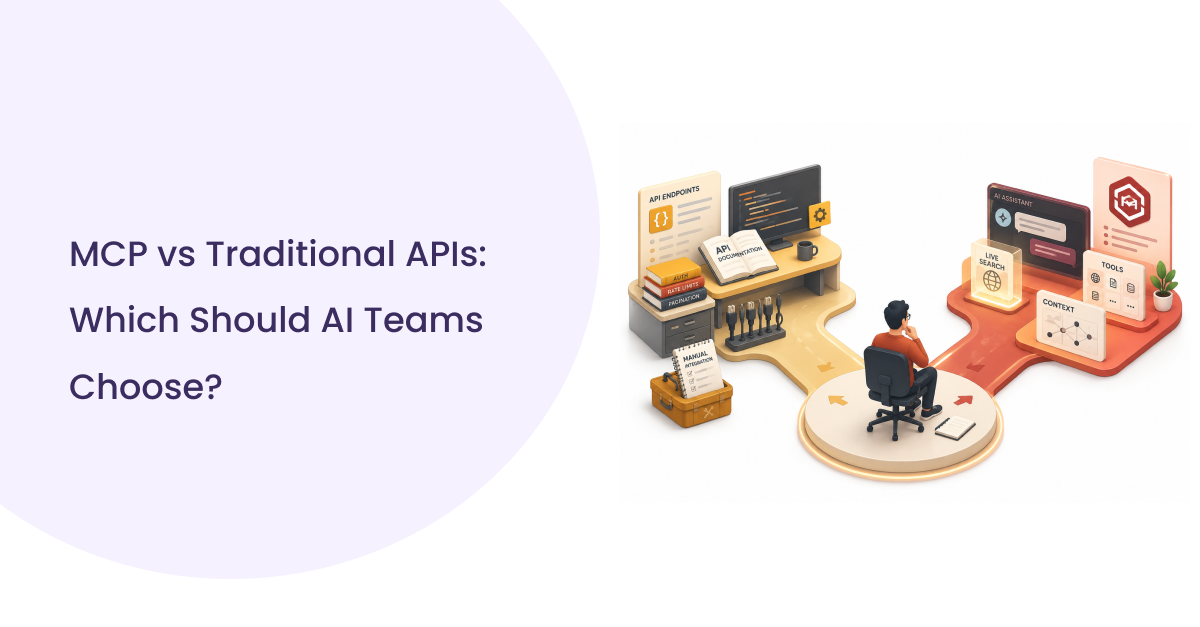
MCP Integration vs Traditional API Integration
| Feature | MCP Integration | Traditional API Integration |
| Integration Method | Standardized protocol for all compatible tools | Custom integration for each API |
| Development Effort | One client connects to multiple MCP servers | Separate code for every service |
| Scalability | Easily adds new MCP-compatible tools | Requires additional development for each integration |
| Maintenance | Lower maintenance with a common protocol | Ongoing updates whenever APIs change |
| Data Access | Standardized real-time access to tools and data | Varies by vendor implementation |
| Best For | Enterprise AI applications and AI agents | Individual application integrations |
MCP Integration standardizes how AI applications connect to external tools through a common protocol, replacing the need for separate integration logic for every service. While non-MCP services may still need a wrapper, MCP reduces integration complexity, speeds deployment, and simplifies long-term maintenance.
Benefits of MCP-Based AI Applications
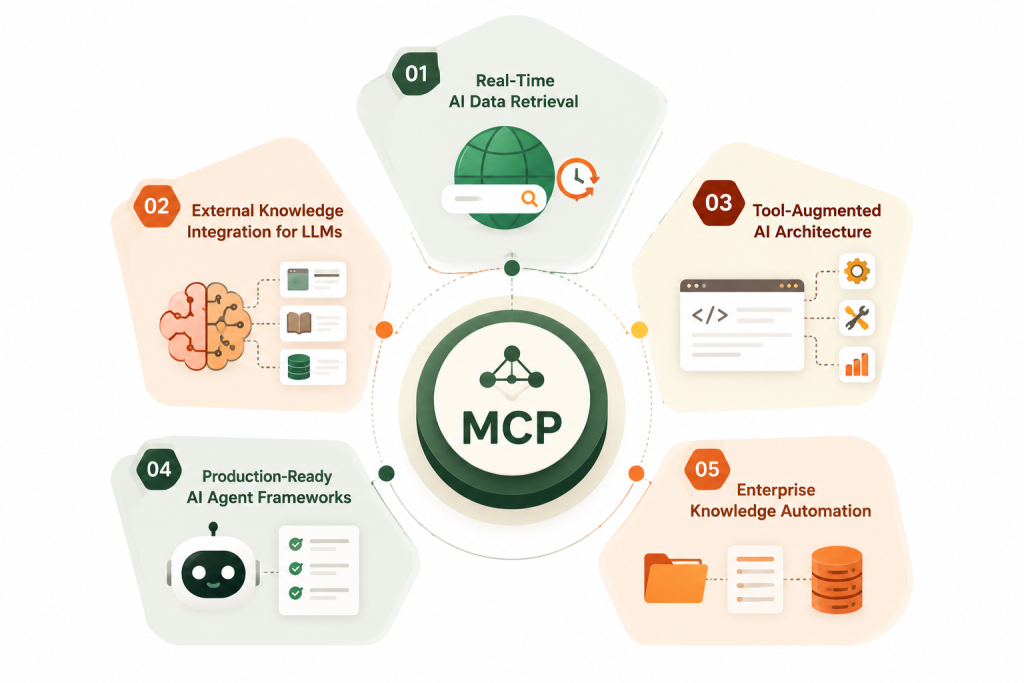
Real-Time AI Data Retrieval
Static training data goes stale the day it is captured. MCP Integration gives models a live pipe to current data, stock prices, ticket status, inventory counts, whatever the business runs on.
This is what people mean by real-time AI data retrieval systems, models that answer with today’s numbers instead of last year’s snapshot. For a full breakdown of what a real-time SERP API actually delivers, including architecture, latency management, and failover structures, see the foundational guide.
External Knowledge Integration for LLMs
A model is only as useful as what it can reach. MCP Integration lets a language model pull from internal wikis, ticketing systems, and file storage without retraining anything.
External knowledge integration used to mean building a custom retrieval pipeline for every source. MCP replaces that with one protocol that every source can speak. For teams implementing this as an RAG pipeline, SERPHouse offers live web retrieval that slots directly into the retrieval layer.
Tool-Augmented AI Architecture
Tool-augmented AI architecture means the model can act, not just answer. MCP Integration exposes calculators, search functions, and internal actions as callable tools that the model chooses on its own.
This shifts AI from a chat box to an operator. A model with the right tool access can look up a record, update a field, and confirm the change in one turn. The AI agents use case covers the full implementation pattern, from tool registration to grounded response generation.
Production-Ready AI Agent Frameworks
Most agent demos fall apart outside a sandbox. MCP Integration brings the pieces production-ready AI agent frameworks actually need: structured logging, permission scopes, and predictable error handling.
Teams that skip this and build a custom tool from scratch usually rebuild it within a year. It gives that structure on day one, which is why it is becoming the default for anyone shipping agents past a proof of concept.
Enterprise Knowledge Automation
Enterprise knowledge automation tools built on MCP Integration connect scattered systems, HR portals, legal archives, and finance dashboards into one queryable layer for the model.
This is where MCP AI applications earn their budget. Instead of five separate chatbots for five departments, one model with the right MCP servers handles all of them, with access enforced per connection.
Common Use Cases of MCP Integration
AI Search with Web Search MCP
- AI search with web search MCP lets a model fetch current web results instead of relying on frozen training data. This closes the biggest trust gap in AI search, answers that were correct a year ago but wrong today.
- A model wired for live search can cite a source, pull the latest figure, and show its work in the same response. SERPHouse’s Web Search API is built specifically for this retrieval pattern, with structured JSON results ready for direct LLM ingestion.
Enterprise Knowledge Assistants
- Enterprise knowledge assistants built with MCP Integration answer from internal documents instead of public web content. Legal, HR, and finance teams each get a scoped assistant pointed at their own systems.
- The real win is permission handling. MCP AI applications respect existing access controls, so an assistant never surfaces a document that a user was not already cleared to see.
Multi-Agent & Distributed AI Orchestration
- Distributed orchestration systems use MCP Integration to let multiple specialized agents share tools without duplicating connections. For the complete MCP architecture for web apps covering the full stack from frontend to vector database, see the implementation guide.
- This pattern scales better than one giant model trying to do everything. It keeps each agent’s tool access scoped and auditable, which matters once a dozen agents run in parallel.
Intelligent Workflow Automation
- Workflow automation stops being a fixed script once an AI search with web search MCP is in place. The model decides which tool to call based on the request, instead of following a hardcoded workflow defined in advance.
- For a complete worked example of this pattern, see building an AI news monitoring agent, a full implementation of MCP-based workflow automation from setup to alert delivery.
- That flexibility is why support, sales ops, and finance teams keep finding new use cases for it after the first one ships.
MCP Integration Examples Across Industries
Customer Support AI
MCP Integration lets a support bot check order status, refund eligibility, and account history in real time instead of asking a human to look it up. Resolution time drops because the model pulls live data mid-conversation.
Enterprise Search
Enterprise search, built as one of the more common MCP AI applications, indexes files, tickets, and wikis behind one query box. Employees stop hunting across five tools and get one answer sourced from whichever system actually holds the record.
For teams monitoring brand coverage, competitor announcements, or industry developments, real-time news monitoring through MCP Integration surfaces current articles from Google, Bing, and Yahoo News the moment they publish without manual source checking.
Internal Knowledge Assistant
An internal knowledge assistant, one of the more common MCP AI applications, answers policy questions straight from the HR handbook or engineering wiki. No stale PDF links.
Healthcare Portal
A healthcare portal built on MCP Integration pulls appointment slots and lab result status without exposing raw database access to the model. Access control stays with the MCP server, not the chat layer.
Finance Assistant
A finance assistant built this way checks live account balances and transaction history. That immediacy is what finance teams actually asked for.
Developer Documentation Search
Developer documentation search through MCP Integration pulls the current API reference instead of a cached snapshot, so code suggestions match the version a team is actually running.
Legal Search
Legal search built on this protocol retrieves the current version of a contract or clause library, cutting the risk of an assistant citing a superseded document.
HR Assistant
An HR assistant using this setup checks live PTO balances and benefits status instead of a generic policy summary, which is what employees actually want answered.
SaaS AI Copilot
A SaaS copilot, one of the more practical MCP AI applications today, reaches into the product’s own data layer, letting the assistant answer account-specific questions instead of generic help text.
Document Intelligence
Document intelligence tools using MCP Integration pull the latest version of a file before summarizing it, avoiding the common failure of summarizing an outdated draft.
Challenges You Should Prepare For
Security and Access Control: Security cannot be an afterthought once MCP Integration is live in production. A misconfigured server can hand a model access to data that an end user should never see.
Beyond access control at the MCP server level, keeping AI search queries private at the infrastructure layer is the complementary concern most teams address too late.
The fix is scoped tokens and per-connection permissions, not blanket API keys. Every rollout needs a review of what each server can touch before it goes live, not after an incident forces the question.
Integration Complexity: AI search with web search MCP reduces long-term maintenance, but the first rollout still takes real engineering time. Teams underestimate the work of wrapping legacy systems that were never built to expose a clean interface.
Budget for that wrapper work upfront. It pays off after the second or third connection, not the first, so early complexity is normal and not a sign the approach failed.
Data Quality and Semantic Context Retrieval: Semantic context retrieval pipelines only return what is actually indexed well. MCP Integration cannot fix bad source data; it just surfaces it faster.
A model connected through MCP AI applications will confidently repeat a wrong record if the underlying system was never cleaned up. Data quality work has to happen before the connection, not after.
Performance, Monitoring, and Governance: Every external call through MCP Integration adds latency to the model that it did not have before. Monitoring which tools get called, how often, and how long they take is not optional at scale.
Governance means logging every tool call for audit, which most early rollouts skip and later regret when compliance asks for a trail.
MCP Integration ROI 7 KPIs: What Executives Should Measure
Operational Efficiency KPIs
Executives evaluating MCP Integration should track three operational numbers before anything else.
- Time saved per employee: hours reclaimed once an assistant answers directly instead of routing to a human.
- Reduction in support tickets: tickets that never got opened because the bot resolved the question directly.
- Faster document retrieval: time to find a policy or record compared to the old search process.
These three numbers show quickly whether it is actually changing daily work or just adding a new interface on top of old friction.
Business & Technical KPIs
Beyond daily operations, AI search with web search MCP needs technical and financial proof points.
- Lower development effort: fewer custom integrations built per new data source.
- AI adoption rate: how many employees actually use the assistant weekly, not just once.
- Cost per AI workflow: real infrastructure and API cost per completed task.
- Productivity improvements: output per employee before and after rollout.
- ROI on AI initiatives: total value delivered against total spend on it and the systems around it.
Track these quarterly. A program with no KPI review after six months is one nobody can defend at budget time.
Why Choose SERPHouse for MCP Integration
SERPHouse builds MCP Integration for teams that need it working in production, not in a slide deck.
- Custom MCP integrations built around your existing stack, not a generic template.
- AI search expertise across e-commerce, SaaS, and enterprise search deployments.
- Enterprise-ready deployment with access control and audit logging built in from day one.
- Scalable and secure architecture that adds new MCP servers without a rebuild.
If your team is still evaluating search infrastructure options before committing to an MCP rollout, compare web search API providers across latency, SERP coverage, JSON output quality, and pricing before the first integration call.
Conclusion
AI delivers the most value when it can interact with your business systems. MCP Integration provides the standardized framework that makes those connections reliable, secure, and scalable.
Instead of building and maintaining separate integrations for every tool, organizations can create a consistent architecture that simplifies future AI expansion. As more business systems adopt MCP, adding new capabilities becomes faster and more cost-effective.
Start with one high-friction workflow, connect it through this approach, and measure the KPIs before expanding. That is how a pilot turns into a program instead of a stalled experiment. Let’s talk through where it fits in your stack first.
FAQs
How does MCP Integration improve AI accuracy?
Instead of relying only on training data, MCP Integration lets AI retrieve current information from connected systems before generating a response.
Why should businesses adopt MCP Integration?
MCP Integration eliminates the need for separate AI integrations for every system, reducing engineering effort while making AI applications easier to expand as new business tools are added.
Can MCP Integration work with existing enterprise software?
Yes. MCP Integration connects AI applications with existing APIs, databases, CRMs, ERP systems, and internal tools without requiring organizations to replace their current technology stack.
Is MCP Integration secure for enterprise environments?
Yes. MCP Integration works with existing authentication, authorization, and permission controls, ensuring AI models access only approved systems and data based on organizational security policies.
Which businesses benefit most from MCP Integration?
Organizations managing multiple business systems, frequent data updates, or AI-driven workflows benefit most by improving automation, operational efficiency, and real-time decision-making.
How long does it take to implement MCP Integration?
Implementation timelines vary by system complexity. Basic integrations may take a few days, while enterprise deployments connecting multiple platforms typically require several weeks.