
Table of Contents
Table of Contents
Modern applications rely heavily on visual data. Product discovery, media platforms, AI pipelines, SEO analysis, and e-commerce all depend on fast and structured image retrieval. A reliable Google Image Search API integration allows developers to pull image results programmatically instead of scraping unstable HTML.
This guide explains how to integrate Google Image Search using SERPHouse in a real application. It covers request structure, parameters, JSON parsing, Python implementation, pagination, and production practices. The goal is not just to make an API call, it’s to build an integration that survives real usage.If you are searching for a practical tutorial on integrating the Google Images API, this article walks through everything from the first request to production deployment.
What Is Google Image Search API Integration?
A Google Image Search API allows developers to retrieve image search results in structured JSON format. Instead of loading a browser and parsing markup, your application receives clean data that includes:
- image URLs
- ranking position
- source pages
- metadata
- dimensions
- search context
This structured approach is essential for applications that require automation, analytics, or scalable media pipelines.
Typical use cases include:
- visual product search
- content discovery platforms
- AI training datasets
- SEO monitoring tools
- image similarity engines
- automated media aggregation
A proper integration transforms image search into a programmable dataset.
Key Features of the Google Images Search API
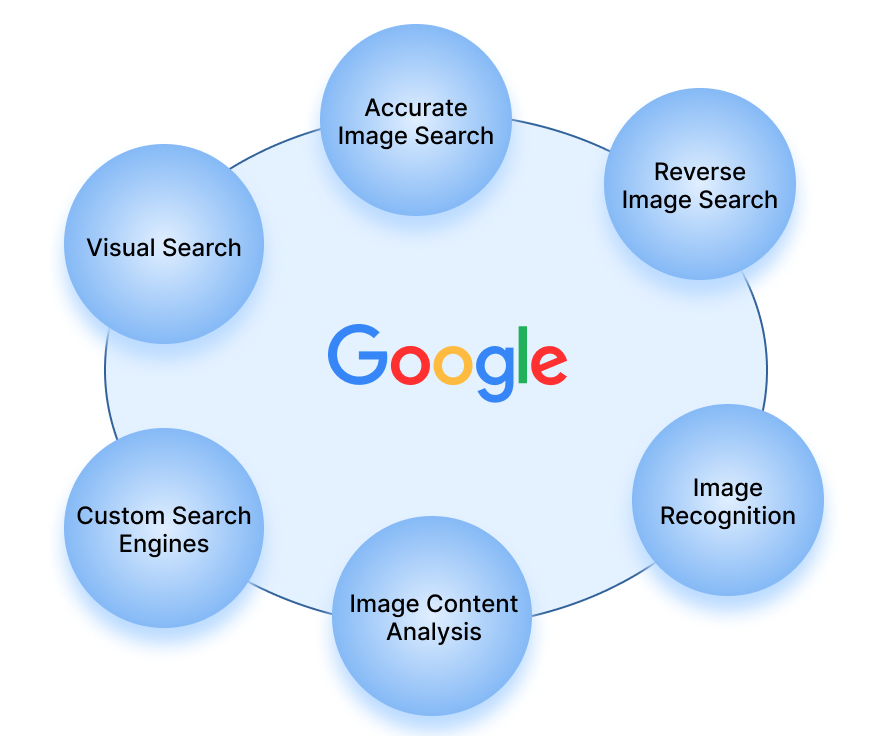
- Accurate Image Search: The API provides highly accurate search results by leveraging Google’s extensive indexing and ranking algorithms.
- Reverse Image Search: This feature allows users to search for images using an existing image as the query, enabling the identification of similar images and sources.
- Image Recognition: Advanced image recognition capabilities can identify objects, landmarks, and other elements within images.
- Image Content Analysis: The API offers detailed analysis of image content, including colour detection, dominant objects, and more.
- Custom Search Engines: Developers can create customized search engines tailored to specific needs, enhancing the relevance of search results.
- Visual Search: Visual search capabilities enable users to find products and content related to the images they upload.
Why Use SERPHouse for Google Images API Integration
Most developers start by attempting browser scraping. That approach breaks constantly because layouts change, CAPTCHAs appear, and IP blocks occur. A structured API avoids those risks.
SERPHouse provides direct Google image SERP access through HTTP requests. It returns predictable JSON and supports location, device simulation, and language targeting critical for global applications.
Key advantages include:
- stable live HTTP GET endpoint
- image SERP type support
- structured ranking data
- geo-targeted results
- mobile and desktop simulation
- scalable request handling
This makes SERPHouse suitable for production-grade Google image API workflows.
Explore our Custom Image Search API to see how it works in detail.
Understanding the Image SERP Endpoint
The integration begins with a simple HTTP GET request.
Baseline request format:
This request asks for Google image search results for a keyword. Each parameter influences the output dataset.
Before writing code, test this endpoint and inspect the raw JSON response. Understanding the structure early prevents fragile assumptions later.
Core Parameters Explained
The Google Images API integration relies on a small set of essential parameters. Each one controls how the search behaves.
Important parameters:
- q → search query keyword
- domain → Google domain (google.com, google.co.uk, etc.)
- lang → language of results
- device → desktop or mobile
- loc → geographic targeting
- serp_type=image → activates image search
Location and device simulation matter more than many developers expect. Image rankings vary across regions and device types. If your application serves international users, these parameters must be dynamic.
Ignoring them creates inconsistent datasets.
Reading the JSON Structure
The API response is structured as a dataset, not a list of links.
A simplified image object looks like:
Example:
Each field carries meaning:
- position → ranking relevance
- image_url → direct media link
- source_url → attribution context
- dimensions → layout control
- format → compatibility filtering
A professional integration stores full objects instead of stripping data. Ranking history, attribution, and metadata become valuable later for analytics.
Systems built on shortcuts eventually require rebuilding.
Python Implementation Example
Most production integrations happen on the backend. Below is a Python example using requests.
Example:
This script fetches image search results and prints the top entries. In a real application, the data would be stored in a database or passed to a UI layer.
Parsing and Storage Strategy
Most beginners think image search results are just visual assets. In reality, they are structured search records. If your application only saves image URLs, you are throwing away intelligence that you will eventually wish you had.
A better mental model is to treat every image result like a database entry. Each request is a snapshot of Google at that exact moment. That snapshot has value beyond display. It contains ranking signals, attribution context, and metadata that can be reused later.
Imagine your system six months from now. You want to know whether a brand image climbed in rankings. If you didn’t store timestamps and positions, that insight is gone forever.
A strong storage structure usually captures:
- keyword that triggered the search
- exact request time
- ranking position
- full JSON metadata
- source page attribution
This structure turns your integration into a searchable archive instead of a temporary viewer. Analytics platforms, SEO tools, and media monitoring systems all rely on this principle. Structured storage is what transforms a simple Google Images API integration into a long-term data asset.
Pagination Handling
Pagination is where many integrations quietly fail.
Developers often test with a single request and assume the system is complete. Then real users start scrolling. Suddenly the application must fetch page two, page three, and beyond. If pagination logic was treated as an afterthought, performance problems appear immediately.
The API already tells your system how to move forward. The safest approach is to follow that instruction instead of inventing your own paging logic. Guessing offsets may seem faster, but it leads to inconsistent datasets and wasted requests.
Proper pagination unlocks real application behavior:
- smooth infinite scrolling galleries
- background preloading of images
- controlled batch retrieval
- predictable performance at scale
When pagination works correctly, users never think about it. The interface simply flows. That invisible smoothness is a sign of a mature Google image search API integration.
Caching for Performance
Here is a simple truth about production systems: live APIs should not do repetitive work.
If ten users search the same keyword within a minute, your backend should not send ten identical requests. That pattern increases latency and cost for no benefit. Caching exists to stop that waste.
A cache acts like short-term memory. The first request fetches live results. The next few requests reuse that stored response until it expires. Users experience instant loading while your infrastructure stays calm.
Teams that implement smart caching notice improvements immediately:
- faster response time
- lower API usage
- more predictable server load
- fewer traffic spikes
Even applications that depend on fresh data can cache briefly. A short window is enough to absorb bursts without sacrificing relevance. Intelligent caching is one of the simplest ways to make a high-performance image search API system feel professional.
Handling Dynamic Search Data
Google image results are not static records. They behave like a moving river. New images appear, old ones vanish, and rankings shift constantly. Treating search results as permanent truth is a design mistake.
Instead, think in terms of snapshots. Every request captures a moment in time. Your job is to preserve that moment and compare it with the next one.
Systems that respect this movement gain powerful capabilities:
- ranking trend analysis
- visibility tracking
- change detection
- historical search comparison
This is why advanced Google image ranking monitoring tools always store timestamps. They are not chasing stability. They are measuring change. Applications that expect motion are resilient. Applications that assume stability eventually break.
Error Handling in Production
No API runs perfectly forever. Networks fail. Timeouts happen. Empty responses appear. A production integration is judged by how it behaves during those moments.
A fragile system panics. A mature system adapts.
Instead of flooding the API with instant retries, your application should slow down and recover gracefully. Controlled retry logic protects both your infrastructure and the provider. Clear logging ensures developers can diagnose problems later without guessing.
Healthy error behavior looks like this:
- retries happen with a delay
- failures are recorded clearly
- Infinite loops are impossible
- Empty responses are accepted safely
- Users receive fallback states instead of crashes
When errors are handled calmly, users rarely notice them. Stability is not about avoiding failure. It is about surviving failure without drama.
Security Best Practices
Security mistakes rarely feel urgent until access suddenly disappears. API credentials are not just configuration values. They are entry keys to your system.
Professional integrations treat credentials like sensitive infrastructure. They are stored outside the source code, restricted by the environment, and monitored continuously.
Good credential hygiene includes:
- environment-based key storage
- IP restrictions where possible
- separate staging and production keys
- regular key rotation
- usage monitoring
These practices are simple, but they determine whether your Google Images API integration remains stable long-term. Security is not an extra step after development. It is part of the architecture.

Real Application Architecture
A real Google Images API integration usually follows this flow:
user request → backend API call → structured storage → caching layer → UI delivery
This separation allows scaling each component independently. Backend services handle requests. Storage preserves datasets. The frontend consumes cached results.
Loose coupling improves reliability.
Testing Before Deployment
Before going live:
- validate pagination behavior
- simulate high traffic
- test error recovery
- confirm caching logic
- Inspect JSON parsing
A quiet deployment indicates strong preparation.
Production surprises usually come from skipped testing.
SEO and Analytics Use Cases
Beyond visual apps, image search APIs are widely used in SEO workflows.
Examples include:
- image ranking monitoring
- competitor media tracking
- visual brand presence analysis
- content discovery research
- SERP dataset archiving
Structured image data unlocks analytics that manual browsing cannot scale.
Final Perspective
A Google Image Search API integration is not just a request. It is a data pipeline. When built correctly, it supports parsing, storage, pagination, caching, analytics, and UI delivery without constant maintenance.
Developers who treat image search as structured infrastructure build systems that scale cleanly and remain stable over time.
The best integrations are invisible. They simply work.