
Table of Contents
Table of Contents
A dental group asks a simple question: “Where do we rank for emergency dentist?” Your tool answers “4.” Then the Brooklyn office manager searches from the waiting room and can’t find the practice on the first screen. The Queens office reports the opposite: the practice shows up first.
Nobody’s data is wrong. The question is. In local search, a ranking is not a property of a keyword. It belongs to a keyword, searched from a specific place, at a specific time, for a specific business. A local rank tracker earns its keep by measuring that combination, not by producing one number.
This guide walks through the architecture of a location-aware local rank tracker: the data model, scheduling, ranking logic, history, and reporting. It uses the SERPHouse Google Local API as the data source, and every request follows the official documentation.
TL;DR
- What it does: A local rank tracker records where a specific business appears in Google’s local results from a defined location, and how that position changes over time. Why city and ZIP matter: distance is one of the three factors behind local results. The same keyword can return a different result set in a neighboring ZIP code.
- What to collect: The keyword, the location (city or ZIP, resolved to a stable location ID), the matched business’s position, its place_id, and a timestamp. Where the API fits: the API returns structured local results (position, title, address, rating, reviews, place_id, GPS coordinates, map URL) for a query and location, and your application handles everything after that.
- How rank is calculated: Find the tracked business in the results, preferably by place_id, and record its position. If it is absent, record “not found within N results”. Never record a guess.
- What to store: Store observations append-only, so you can compare markets, compute movement, and audit anomalies.
What a Local Rank Tracker Actually Measures
A traditional rank tracker answers “Where does my URL rank for this keyword?” It tracks a domain against a country or city level, and treats the answer as roughly stable for that market.
A location-aware local rank tracker answers a narrower and more useful question: “Where does this business appear in the local results for this keyword, searched from this place, on this date?” That adds three dimensions a generic tool can treat as secondary.
| Dimension | Traditional rank tracker | Location-aware local rank tracker |
| Unit tracked | URL or domain | Business entity (a place) |
| Location | Often one market per keyword | A defined set of cities, ZIP codes, and locations per keyword |
| Result type | Organic | Local Pack / local results |
| Identity check | URL match | place_id, name, address |
| Main output | One position per keyword | A position per keyword × location |
Treat that last row as the design principle for local SERP tracking. Every other decision follows from it. A checker that returns one number per keyword is answering a different question.
Why City and ZIP Code Tracking Changes the Answer
Google’s own Business Profile help page lists three factors behind local results: relevance, distance, and prominence. Google explains that “distance refers to how far each business is from the customer who’s searching” (Google Business Profile Help). If distance affects the SERP, then the search location has to be a controlled variable in your local rank tracker.
Here is what that looks like. These are illustrative, not real SERPHouse measurements:
| Keyword | Location | Position |
| emergency dentist | New York | 3 |
| emergency dentist | Manhattan | 5 |
| emergency dentist | Brooklyn | 1 |
| emergency dentist | Queens | 8 |
A city rank tracker reporting only “New York: 3” would hide a borough where the practice is effectively ranking poorly. ZIP-level tracking exposes it. So does neighborhood-level tracking. Neither is more “correct”. They answer different questions:
- City-level rankings are useful for executive summaries.
- ZIP-level rankings are specific to a branch or service zone. They are what a location manager acts on.
- Neighborhood or borough tracking suits dense metros.
Good geographic targeting means choosing locations on purpose, for each business, and then keeping them fixed so results stay comparable over time.
The Architecture of a Local Rank Tracker
The whole local rank tracker is a pipeline. Each stage has a single job, and the split between observed data (what the API returned) and derived data (what your app computed) runs through every stage.
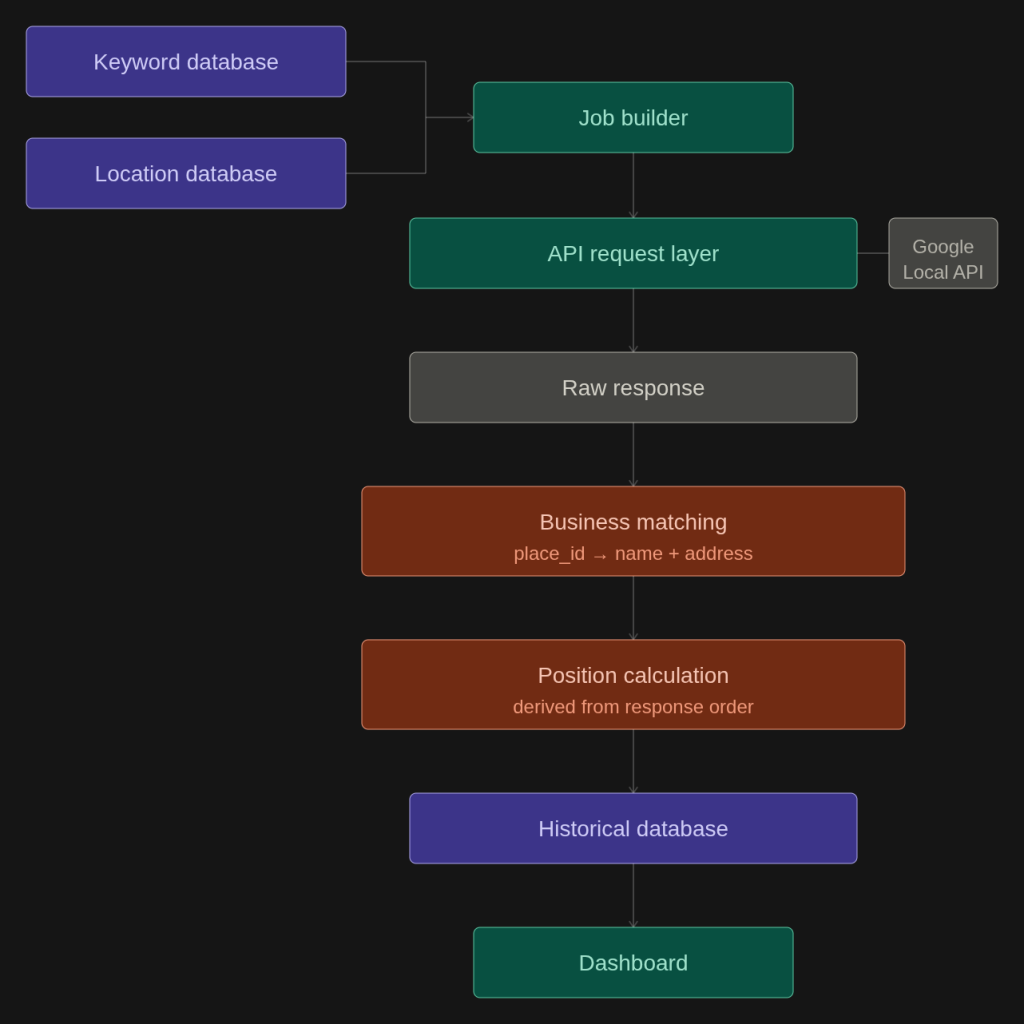
- Keyword and location databases: People edit these.
- The job builder: Expands keyword × location requests.
- The API request layer: Handles authentication, retries, and rate pacing.
- The raw response store: Keeps the original response so that if your matching rule changes, you can re-derive rankings without paying for new requests.
- Business matching: Decides which result, if any, is the tracked business.
- Rank calculation: Turns the matched result into a classification and a change versus the previous run.
- The historical database: Stores observations for reporting.
Step 1: Model the Inputs
Before making any requests, avoid beginner implementations that collapse everything into one “keyword” row. This is a recommended application-level data model. These are not API fields:
project_id, client_id
business_id, business_name, business_domain, place_id (once known)
keyword_id, keyword, language
location_id, city, state, country, zip_code, serphouse_loc_id, latitude, longitude
search_config_id, domain, lang, page_depth, tracking_frequency
observation_id, keyword_id, tracked_at
The separation matters because each entity has its own schedule. A client adds a branch, which is a new business, without touching keywords. You add a ZIP code without rewriting keywords. Search configuration is versioned, so a change in depth or language starts a new series instead of corrupting the old one.
Keep reference data for your own maps and distance calculations separate from request inputs.
Step 2: Query Google Local Results
The Google Local API docs define a single POST endpoint with four required inputs: q, domain, lang, and loc_id. An optional page parameter returns up to 20 local results per page.
Resolve every location to a stable ID once, using the Locations List endpoint (GET https://api.serphouse.com/location/search?q=10001&type=google). In SERPHouse’s Google locations file, ZIP 10001 is loc_id 9004056 (“10001, New York, United States”), with the location type appearing as a borough. Storing the ID instead of a free-text string removes a whole class of “New York” vs. “New York City” inconsistencies.
A basic request pattern looks like this:
Each item in local_results carries position, title, address, rating, reviews_count, place_id, coordinates, type, website_url, map_url, and more. The response also echoes search_parameters, including the resolved location and the query, because they are your proof of what was actually measured.
Step 3: Identify the Target Business
Extracting positions is easy. Deciding which result is your business is where most local rank tracker mistakes happen.
Name-only matching fails with multiple branches (“ABC Dental” × 6 branches), shared buildings, and renames. SERPHouse’s own sample response illustrates the risk: two different businesses can have a similar name, a different street address, and identical GPS coordinates. Address or coordinate matching alone would merge them.
Use a layered approach:
- place_id (exact). It is returned in the response. Once a business is confirmed, store its place_id and match on it from then on.
- Normalized name + address. Strip punctuation and suffixes like “LLC” or “PC”, then compare address tokens. Use this to find the place_id the first time.
- website_url (supporting signal only). It is often null in local results, so never require it.
- Coordinates (tie-breaker). Useful to disambiguate branches. Not sufficient alone.
Treat a name match whose address differs from the stored address as an alert, not a rank. It usually means a duplicate listing or a competitor with a similar name.
Step 4: Turn Results Into Observations
A match becomes one observation:
Keyword: emergency dentist
Location: 10001 (loc_id 9004056)
Business: Example Dental
Position: 4
Pages_fetched: 1
Status: found
Tracked_at: 2026-10-05
Three statuses keep the data honest:
- found – the business was found in the returned results.
- not_found – the business is absent from the positions you fetched.
- failed – the request or validation failed.
Never write not_found as position 21.
Movement is simple arithmetic on consecutive comparable observations:
rank_change = previous_position – current_position # positive = improved
Visibility buckets such as Top 3, Top 5, Top 10, Top 20, and Not found within tracked results are useful classes for reporting. They are not Google categories.
Step 5: Build the City × ZIP Location Matrix
This is where a ZIP code rank tracker beats spot checks in a browser. Define, per business, the cities and ZIP codes you want to track, then fan out:
| for keyword in project.keywords: for location in project.locations: # city, borough, ZIP rows, each with loc_id job = (keyword, location.loc_id, search_config) if job not in already_queued_jobs: enqueue(job)worker: results = fetch_local_results(job) # retry on 429/500/”Please try again” save_raw(job, results) for business in businesses: save_observation(match(business, results)) |
Note the deduplication. The result set for “plumber near me” in 78704 is the same no matter how many businesses you track. Fetch it once and match many businesses against it.
The illustrative output looks like this:
| Keyword | City | ZIP | Position |
| plumber near me | Austin | 78704 | 3 |
| plumber near me | Austin | 78705 | 7 |
| plumber near me | Austin | 78701 | 2 |
Illustrative values.
What the Data Represents: Local Pack, Local Results, and Google Maps
Precision matters here, because “Google Maps rank” is used loosely across the industry. Google shows three related experiences: the Google Local Pack (a short block inside the main results), the expanded local results view in Google Search, and Google Maps.
The SERPHouse Local API search request uses location encoding. Its position is therefore the business’s order in Google Search’s local results, with up to 20 results per page. That is what you are tracking.
For a Map Pack tracker, it is a strong proxy for pack visibility and local positions, but it is not a replay of every Maps session, such as one where a user pans the map.
Label your reports accordingly. “Local results position” is accurate. “Exact Maps rank everywhere” is not.
Desktop vs. Mobile Local Results
Device can change what users see, so a mature tracker treats device as a dimension rather than assuming all local results are identical. Local results do not always differ, but you cannot know which keywords diverge without measuring both.
Check what each endpoint supports. The Local API example response echoes “device”: “desktop”. The Google Search API documents a device parameter (desktop or mobile) and says its response includes the local pack.
A practical design stores Local API positions as one series and Search API positions per device as separate series. Never average them together.
Store History and Query It
Rankings are only meaningful as a time series, so a local rank tracker should keep observations append-only.
CREATE TABLE local_rank_observations (
observation_id BIGINT PRIMARY KEY,
business_id BIGINT NOT NULL,
keyword_id BIGINT NOT NULL,
location_id BIGINT NOT NULL, — holds city, zip_code, loc_id
search_config_id BIGINT NOT NULL, — lang, device/source, depth
status VARCHAR(12) NOT NULL, — found | not_found | failed
position INT NULL,
place_id VARCHAR(64) NULL,
result_count INT,
raw_response_id BIGINT NOT NULL,
tracked_at TIMESTAMP NOT NULL
);
CREATE INDEX idx_obs_search
ON local_rank_observations
(business_id, keyword_id, location_id, tracked_at);
Then the core read pattern, here showing one business’s full position history across every keyword and location:
SELECT l.city, l.zip_code, o.status, o.tracked_at
FROM local_rank_observations o
JOIN locations l ON l.location_id = o.location_id
JOIN keywords k ON k.keyword_id = o.keyword_id
WHERE o.business_id = ?
ORDER BY o.tracked_at DESC, l.city, l.zip_code;
This history is what enables daily, weekly, and monthly movement, city and ZIP comparisons, competitor analysis, and location-level trends for your local SEO rankings.
Metrics and the Dashboard
Position alone is a thin KPI for a local rank tracker. These are recommended tracking metrics, not Google metrics:
| Metric | Definition |
| Average local position | Mean position across found observations. Always report the denominator. |
| Top 3 visibility | % of observations ranking in positions 1-3 |
| Top 10 visibility | % of observations ranking in positions 1-10 |
| Location coverage | % of tracked locations where the business was found |
| Ranking movement | Sum of position change versus the prior run |
| Competitor share | % of observations where a named competitor ranks above you |
| Geographic visibility | Visibility by city or ZIP |
A practical dashboard has average position, Top 3 and Top 10 counts, gains, and losses. Geographic is a city or ZIP table (or map) with position and change versus previous position for each location. Competitor shows who outranks you and where. Trend covers position over time and begins with the data model first. The dashboard is just queries over it.
Worked Example: 20 Dental Clinics Across 5 Cities
An agency manages 20 clinics in 5 cities and tracks 50 keywords weekly, at city level plus four ZIP codes per city.
- Import keywords: 50 keywords.
- Add businesses: 20 clinics, each linked to its city and confirmed place_id. Add 3 named competitors.
- Define cities: 5 location rows, each resolved to a loc_id.
- Add ZIP codes: 20 ZIP codes.
- Create jobs: 50 keywords × 25 locations = 1,250 requests per weekly run, with depth one page. Each request serves every clinic and competitor in that location, so adding a 21st clinic in an existing city adds no requests.
- Query: Pace requests to your plan’s limit. SERPHouse documents 60 requests/minute on its API, so 1,250 requests take at least about 21 minutes.
- Identify businesses: Match by place_id, then flag anomalies.
- Store positions: Append observations and keep raw JSON.
- Compare: Compute weekly movement.
- Report: One report per clinic, listing its ZIP codes, top movers, and competitors above it.
Check current credit costs when sizing a plan.
Scaling and Reliability
At 10 keywords × 5 locations, you have 50 jobs per run, which is easy to run as a local rank tracker. At 10,000 keywords × 500 locations (5 million jobs per run), you need:
- A job queue with idempotency based on (keyword_id + location_id + config_id), so retries never double-write.
- Rate pacing set to your plan limit, with backoff on 429.
- Retry rules: retry 429, 500, and 200 with “Please try again”. Don’t retry 400, 401, or 402. Fix the underlying request or account issue.
- Validation before an observation is accepted: an empty result list for a high-volume query, a mismatched entity, duplicate place_ids in one response, or a jump of more than N positions should be flagged for re-check.
- Indexing and partitioning on (business, keyword, location, tracked_at), with monthly partitions for scale.
- Pre-aggregated rollups so dashboards never scan raw history.
- Consistent conditions: location, language, device or source, depth, and run time held stable. Change any of them and you start a new series.
Common Implementation Mistakes
- Tracking keywords without locations.
- Mixing location strings and loc_ids for the “same” place.
- Matching businesses by name alone.
- Ignoring duplicate or merged listings.
- Overwriting yesterday’s observations.
- Blending device or source series into one average.
- Comparing runs with different configurations.
- Treating one city as the whole market.
- Reporting a single snapshot as a stable ranking.
- Storing derived metrics without the raw response behind them.
- Leaving city, state, and ZIP definitions inconsistent.
- Tracking only the client and not the competitors above it.
- Designing the dashboard before designing the data model.
- Hard-coding “near me” assumptions instead of explicit locations.
- Treating rank as the only KPI. Impressions, review counts, and coverage matter too.
API vs. Manual Checks, and Local vs. Generic Trackers
| Manual Google Maps checks | Dedicated local rank tracker |
| Repetitive, and dependent on the searcher’s own location | Controlled location set |
| Hard to scale past a few keywords | Scales to a keyword × location matrix |
| No reliable history | Full historical database |
| Few locations | City, borough, and ZIP |
| Screenshots in reports | Dashboards and exports |
Generic rank trackers often support location targeting, but local results and entity matching are typically secondary features. In a dedicated local rank tracker, features vary by platform, so compare specific features rather than categories.
Where SERPHouse Fits in the Stack
SERPHouse is the data acquisition layer: structured local results for a query and location, returned as structured data. Your application owns everything that makes it a tracker: the location matrix, matching, history, metrics, and reports.
The same data supports market analysis, reputation tracking, location-based platforms, and BI reporting. The use cases listed on the Google Local API page include Business Profile data for a matched place. The Place Details API accepts the place_details_id from a Local API result.
For agencies, that pipeline can power dashboards, white-label weekly emails, a page for each location, competitor alerts when a rival enters a client’s Top 3, and local coverage data instead of anecdotes. See how the Local SEO use case applies this, or compare it with organic tracking.
Building a local rank tracker for cities and ZIP codes? Start with structured local search data and build the ranking logic around your own keywords, businesses, and locations, then make your first request from the Google Local API documentation.