
Table of Contents
Table of Contents
Ecommerce pricing moves faster than most teams can track manually.
A competitor can change a product price in the morning, launch a discount in the afternoon, and change it again before the day ends. If your team is still checking competitor websites one by one or updating spreadsheets manually, you are working with yesterday’s information while the market is already moving.
This is where a Web Search API for Ecommerce becomes useful.
Instead of manually searching products, comparing sellers, copying prices, and updating reports, you can connect search data directly to your pricing system, dashboard, spreadsheet, or internal application.
For ecommerce brands, the biggest opportunity is not simply collecting more product data. It is knowing what competitors are selling, at what price, in which market, and how those prices are changing over time.
This guide explains how ecommerce brands can use a Web Search API for competitor price monitoring, what data to collect, how to build a basic monitoring workflow, and what to look for when choosing an API.
What Is a Web Search API for Ecommerce?
A Web Search API for Ecommerce is a programmatic way to retrieve search results and product-related information from search engines without manually performing each search.
Instead of opening Google and searching:
wireless headphones
your application can send the query to an API and receive structured data that your system can process.
Depending on the search type, the response can include information such as:
- Product titles
- Prices
- Seller names
- Product URLs
- Ratings
- Review counts
- Availability
- Discounts
- Shopping results
- Search positions
- Images
- Location-specific results
For ecommerce teams, this creates a much easier way to collect competitive market information.
For example, imagine you sell running shoes and want to monitor five competitors across 500 products.
Checking those products manually every day would take hours.
An API-based workflow can send those product queries automatically, collect the latest results, compare them with your own pricing data, and flag meaningful changes.
That changes price monitoring from a manual research task into a repeatable data workflow.
Why Ecommerce Brands Need Search Data for Price Monitoring
Price is one of the easiest things for shoppers to compare.
A customer searching for a specific product can see several sellers, prices, ratings, and offers before visiting any store. That means your competitive position can change without you changing anything.
Your competitor only needs to lower its price.
Suppose your product is listed at $149 while three competing sellers are showing:
- Competitor A: $139
- Competitor B: $142
- Competitor C: $145
Your product suddenly looks expensive.
The bigger problem is that you may not know this happened until sales start declining.
That is why real-time or regularly refreshed competitive data matters.
A Web Search API for Ecommerce can give your systems a consistent source of search and shopping data, so your team can identify these changes earlier.
The goal is not to automatically copy every competitor price.
The goal is to understand the market well enough to make a better pricing decision.
What Can You Monitor With an Ecommerce Search API?
Price is only one part of competitive monitoring.
A good monitoring system can track several pieces of information at the same time.
Competitor Prices
The most obvious use case is tracking how much competitors charge for the same or similar products.
You can compare your current price against:
- Lowest competitor price
- Highest competitor price
- Average market price
- Median market price
- Specific competitor prices
For example, if your product sells for $100 and the market range is $94 to $108, you have a very different situation than if the market range suddenly becomes $79 to $85.
The raw price matters, but the change in the market often matters more.
Discounts and Promotions
Competitors do not always change their base price.
They may introduce:
- Percentage discounts
- Sale prices
- Limited-time offers
- Promotional pricing
- Free shipping
- Bundle offers
Tracking these changes gives your team a better view of what customers are actually seeing.
Product Availability
Price without availability can be misleading.
A competitor may show a very low price but have the product out of stock.
If your monitoring system tracks availability alongside price, your pricing team can distinguish between a genuine competitive threat and a listing that customers cannot currently purchase.
Seller Information
The same product can appear from multiple sellers.
Tracking seller information helps answer questions such as:
- Which retailers are competing with us?
- Which sellers consistently offer the lowest prices?
- Are new sellers entering the market?
- Which resellers are discounting our products?
This becomes especially useful for brands that distribute products through multiple retailers.
Ratings and Reviews
Price is not the only factor shoppers consider.
A product priced slightly higher may still compete effectively if it has significantly stronger ratings or a larger review base.
Including ratings and review counts in your monitoring data gives your team additional context when evaluating competitor offers.
How Competitor Price Monitoring Works
A basic monitoring workflow does not need to be complicated.
The process can look like this:
Product list → Search API → Structured results → Price comparison → Change detection → Alert or dashboard
Let’s break that down.
Step 1: Create Your Product List
Start with the products you actually care about.
For each product, store information such as:
| Field | Example |
| Product name | Wireless Headphones |
| SKU | WH-1000 |
| Your price | $149 |
| Target competitors | 5 |
| Search query | wireless headphones |
| Market | United States |
You do not need to monitor your entire catalog on day one.
Start with your highest-selling or most competitive products.
Step 2: Send Product Queries to the API
Your system sends product-related queries to the search API.
For example:
wireless headphones
Nike Air Max 270
Sony WH-1000XM5
4K OLED TV 55 inch
running shoes men
The API retrieves the relevant search or shopping results.
Step 3: Store the Results
Save the returned data in a database, spreadsheet, or data warehouse.
A useful record might contain:
{
“product”: “Wireless Headphones”,
“seller”: “Competitor A”,
“price”: “$139.99”,
“availability”: “In Stock”,
“rating”: 4.7,
“reviews”: 1240,
“url”: “https://example.com/product”
}
The exact response structure depends on the API you use, but the important part is consistency.
Step 4: Compare the New Data With Previous Data
Now you can compare today’s price with yesterday’s price.
For example:
| Seller | Previous | Current | Change |
| Competitor A | $149 | $139 | -6.7% |
| Competitor B | $145 | $145 | 0% |
| Competitor C | $152 | $149 | -2% |
Your system can then identify the changes that deserve attention.
Step 5: Trigger an Alert
You do not need someone staring at a dashboard all day.
Create rules around the changes that actually matter.
For example:
IF competitor price drops by more than 5%
THEN send pricing alert
Or:
IF competitor price becomes lower than our price
THEN add product to review list
This turns raw search data into something your team can act on.
A Practical Example of Competitor Price Monitoring
Imagine an ecommerce brand sells fitness equipment.
One of its best-selling products is a $299 adjustable dumbbell set.
The team monitors three competitors.
On Monday:
- Your price: $299
- Competitor A: $305
- Competitor B: $309
- Competitor C: $299
On Tuesday:
- Your price: $299
- Competitor A: $289
- Competitor B: $309
- Competitor C: $299
Competitor A has suddenly become the cheapest seller.
Your monitoring workflow detects the change and sends an alert.
The pricing team can then investigate.
A competitor might have launched a 24-hour sale.
Old inventory could be getting cleared.
Your own pricing may now be too high, or matching the competitor could hurt your margins.
The API does not make that decision for you.
It gives you the current market information needed to make the decision.
That distinction is important.
Good price monitoring should inform pricing strategy, not blindly automate price matching.
Why Manual Competitor Price Tracking Stops Working
Manual monitoring sounds manageable when you have 20 products.
It becomes a different problem when you have 500, 5,000, or 50,000.
Consider a team tracking:
- 1,000 products
- 5 competitors
- 2 markets
- One check per day
That creates 10,000 product-competitor checks every day.
Even if each check takes only 30 seconds, that is more than 83 hours of checking every day.
The math makes the problem obvious.
Manual tracking also introduces other problems:
- Human errors
- Missing price changes
- Inconsistent checking times
- Outdated spreadsheets
- Duplicate work
- No historical record
- Difficult reporting
Automation removes much of that repetitive work.
Web Search API vs. Manual Search for Ecommerce
The difference is not simply speed.
It is also about how the information can be used.
| Manual Search | Web Search API |
| Search products individually | Send queries programmatically |
| Copy data manually | Receive structured data |
| Update spreadsheets | Store data automatically |
| Difficult to repeat | Easy to schedule |
| Limited scale | Designed for large request volumes |
| Hard to maintain history | Build historical datasets |
| Human-dependent | Connect with automated workflows |
Manual research still has a place.
If you are investigating one competitor or researching a new product category, opening Google and checking the results yourself can be perfectly reasonable.
But recurring price monitoring is a different job.
That is where an API starts making sense.
What Data Should an Ecommerce Brand Track?
Not every brand needs every available field.
The right data depends on what you are trying to measure.
For competitor price monitoring, I would start with:
Product Name: This tells you which listing the result represents.
Price: This is the core field for price comparisons.
Currency: Important when monitoring multiple countries. A $100 product and a €100 product are obviously not equivalent.
Seller: You need to know who is offering the product.
Product URL: This lets your team quickly investigate a listing after an alert.
Availability: A low price is less relevant when the product is unavailable.
Rating: Useful for understanding the competitive position beyond price.
Review Count: A competitor with 4.8 stars and 15,000 reviews may have a stronger offer than a seller with 5 stars and 12 reviews, even when the price difference is small.
Location: Pricing and sellers can differ between markets.
A brand operating in the US, UK, and India should not assume that one market represents another.
Why Location Matters in Ecommerce Price Monitoring
This is one area ecommerce teams often overlook.
Search results can change depending on the location, search domain, language, and device used.
A product search from New York can show different sellers and prices than the same query from London.
That matters for international brands.
Suppose you sell the same headphones in:
- United States
- United Kingdom
- Germany
- India
You may have different competitors in each market.
Your pricing strategy should therefore be based on the market you are actually selling into.
A Web Search API for Ecommerce with location-based search lets you collect market-specific results instead of relying on one generic search.
SERPHouse supports searches across countries and locations available through Google’s location parameters, which makes this useful for brands tracking competitive pricing across different markets.
How SERPHouse Can Power Ecommerce Price Monitoring
SERPHouse provides structured search data from Google, Bing, and Yahoo, with support for different SERP types. Its Google Shopping capabilities are particularly relevant for ecommerce teams because Shopping results expose product and seller information in a format that can be used for price monitoring workflows.
For example, SERPHouse can return product information such as:
- Product title
- Price and currency
- Seller information
- Ratings
- Review counts
- Product availability
- Product links
This gives developers the data layer they need to build their own monitoring system rather than forcing the pricing team to work inside another closed dashboard.
That distinction can matter for growing ecommerce businesses.
You might already have your own:
- Pricing database
- ERP
- BI dashboard
- Google Sheet
- Internal application
- Slack workflow
- Repricing system
Instead of replacing those systems, the API can feed search data into them.
Building a Simple SERPHouse Price Monitoring Workflow
A basic setup could look like this:
Product Catalog
↓
Product Search Queries
↓
↓
Structured JSON
↓
Price Comparison Logic
↓
Database / Google Sheets
↓
Alerts / Dashboard
Suppose your application sends:
Sony WH-1000XM5
to the Google Shopping endpoint.
Your system can collect the returned listings, extract relevant prices and sellers, and compare those results with your internal product database.
Then you can apply rules such as:
Competitor price < our price
→ Flag product
or:
Competitor price drops > 5%
→ Send alert
or:
Three or more competitors change price
→ Review category pricing
The rules are yours.
The API simply provides the market data.
Why Structured JSON Matters
This part sounds technical, but it has a direct business impact.
Imagine receiving raw HTML every time you need competitor pricing.
Your development team would need to:
- Parse the HTML.
- Find the correct product elements.
- Extract prices.
- Identify sellers.
- Clean the values.
- Handle layout changes.
- Convert everything into your internal format.
That is a lot of work before the pricing team even sees the data.
A structured API response cuts down that processing.
SERPHouse describes its SERP API as returning Google search data in JSON, with REST-based integration and support for multiple search result types.
For an ecommerce workflow, that means the response can move more directly from the API into your application.
Google Shopping API vs. Traditional Web Scraping
Ecommerce teams often consider building their own scraper first.
It can work for a small experiment.
The problem appears when you turn that experiment into a production system.
A scraper may depend on page structures that change. Your team then has to maintain selectors, deal with failed requests, manage infrastructure, and handle data cleaning.
A search API moves much of that infrastructure responsibility to the API provider.
| Factor | Custom Scraper | Search API |
| Initial setup | More development work | Faster integration |
| Data format | Usually raw HTML | Structured response |
| Maintenance | Your team handles it | Provider handles extraction layer |
| Scaling | Requires infrastructure | API-based scaling |
| Location targeting | More setup | API parameters |
| Integration | Custom | REST/API workflow |
| Monitoring | Build yourself | Connect to your existing system |
This does not mean an API is automatically better for every situation.
If you need highly specific data from a particular website, custom extraction may still make sense.
But if your goal is search-based competitor and price monitoring, a search API can remove a large amount of repetitive engineering work.
How to Build a Price Change Alert System
Once you have historical data, you can make your monitoring system much more useful.
The basic formula is simple:
Price Change % =
(Current Price – Previous Price)
÷ Previous Price × 100
For example:
Previous price = $200
Current price = $180
Price change =
($180 – $200) ÷ $200 × 100
= -10%
Your system can then define thresholds.
For example:
0% to -2%
→ Ignore
-2% to -5%
→ Add to dashboard
Below -5%
→ Send alert
You can also create different thresholds for different product categories.
A 3% change might matter for electronics but not for low-cost accessories.
This is where your internal pricing strategy becomes more important than the API itself.
Don’t Automatically Match Every Competitor
This is probably the most important pricing lesson in the entire workflow.
Competitor monitoring does not mean competitor copying.
If another retailer drops a product from $100 to $70, matching them immediately may look competitive.
But what if:
- Their inventory is almost gone?
- Their product is an older model?
- They have a different shipping cost?
- They are running a temporary promotion?
- Your margins cannot support the same price?
Automatically matching every change can turn a useful monitoring system into a margin-destroying machine.
Use competitor data as an input.
Then combine it with:
- Your margin
- Inventory levels
- Product demand
- Shipping costs
- Promotion strategy
- Customer value
- Competitor availability
That gives your pricing team a much better basis for action.
Ecommerce Use Cases Beyond Price Monitoring
Although competitor pricing is the main use case, the same search data can support other ecommerce workflows.
Market Research
Search product categories and identify which sellers dominate specific queries.
Product Discovery
Monitor search results to identify products, brands, and categories appearing frequently for relevant queries.
Promotion Monitoring
Track competitor discounts and identify when major promotions start.
Seller Monitoring
Identify new sellers entering a category or competing for your branded products.
Product Availability Monitoring
Track whether competitor products are in stock or unavailable.
Market Expansion
Compare search results and pricing across different countries before entering a new market.
This is why a Web Search API for Ecommerce can be more useful than a simple price feed.
It gives your team access to broader market information that can feed several workflows.
How Much Does a Web Search API for Ecommerce Cost?
Pricing depends on the provider, request volume, search type, and features you need.
The important thing is to calculate your expected usage before choosing a plan.
For example:
1,000 products
× 5 competitors
× 1 check per day
= 5,000 checks per day
Over 30 days:
5,000 × 30
= 150,000 checks per month
But you should not assume every product needs to be checked every hour.
A better approach is to divide your catalog into groups.
High-priority products
Check several times per day.
Normal products
Check once or twice per day.
Low-priority products
Check a few times per week.
That reduces API usage while keeping the products that matter most under closer observation.
SERPHouse currently offers a free plan with 4,000 API credits per month, while paid plans provide higher request limits and support multiple SERP types, including Shopping.
What Should You Look for When Choosing a Web Search API?
Do not choose an API simply because it has the lowest price. For ecommerce monitoring, I would check these areas first.
Search Accuracy
If the results do not represent the products you are looking for, every comparison built on them becomes unreliable.
Structured Responses
JSON responses make it easier to move data into your database, scripts, dashboards, and automation workflows.
Location Support
International ecommerce brands need the ability to monitor different markets.
Search Types
If your workflow requires Google Shopping, make sure the provider actually supports the search type you need.
Request Limits
Calculate your expected monthly requests before selecting a plan.
Reliability
A monitoring system is only useful when data arrives when you expect it.
Documentation
Your developers should be able to understand authentication, parameters, responses, errors, and examples without spending days figuring out the basics.
Pagination and Scale
If you need to monitor large product catalogs, check how the provider handles larger result sets and repeated requests.
A Practical Architecture for Ecommerce Teams
If you are building an internal price monitoring system, you do not need to create everything at once.
A simple architecture can start with:
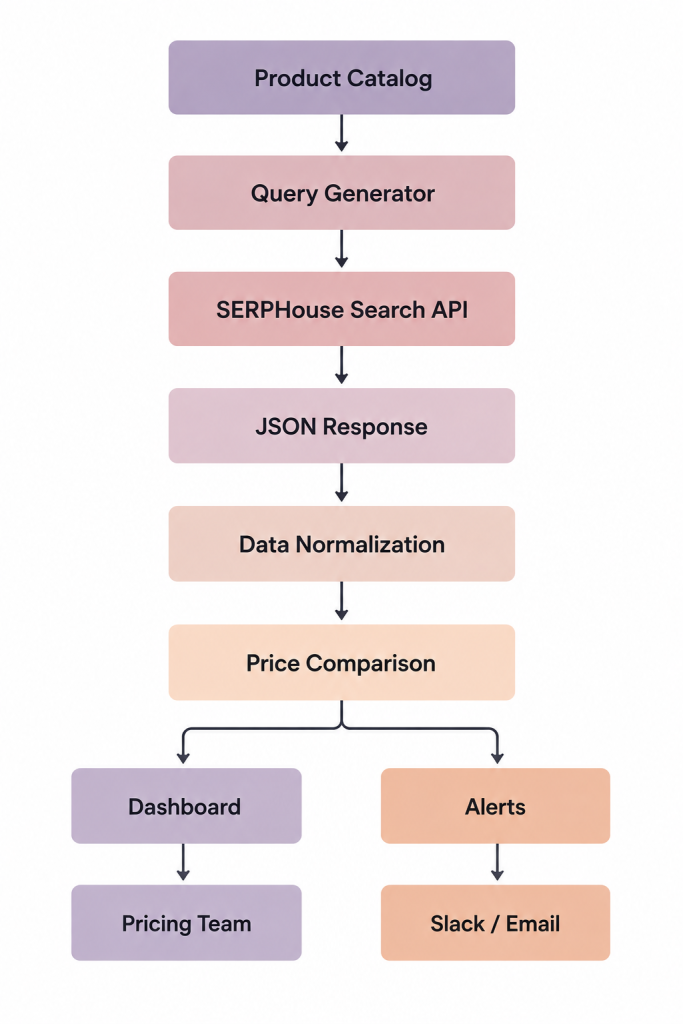
As the system grows, you can add:
- Historical price charts
- Competitor scorecards
- Category-level analysis
- Automated reports
- Repricing rules
- Inventory signals
- Multiple geographic markets
Start with the smallest useful workflow.
Get the data right first.
Then add automation.
Final Thoughts
Ecommerce pricing is too dynamic to rely entirely on manual checks.
Competitors change prices. Promotions appear and disappear. New sellers enter the market. Products go out of stock. The market you are competing in today may look different tomorrow.
A Web Search API for Ecommerce gives your team a way to collect this information programmatically and connect it to the systems you already use.
The biggest benefit is not simply getting a competitor’s price.
It is building a repeatable process around that data.
You can track competitor prices, detect meaningful changes, compare markets, monitor availability, identify promotions, and give your pricing team a clearer view of what is happening in the market.
SERPHouse provides structured Google, Bing, and Yahoo search data, along with Google Shopping capabilities that can be used for ecommerce price and competitor monitoring workflows.
If you are currently checking competitor prices manually, start small.
Pick your top 50 products.
Track the five competitors that matter most.
Run the checks on a schedule. Store the results.
Then create alerts for the changes that actually affect your business.
That is when search data stops being another spreadsheet and starts becoming part of your pricing operation.
FAQ
What is a Web Search API for Ecommerce?
A Web Search API for Ecommerce lets businesses retrieve search and shopping data programmatically. Ecommerce teams can use this data for competitor price monitoring, product research, seller tracking, availability monitoring, and other market intelligence workflows.
How can ecommerce brands use a Web Search API for competitor price monitoring?
Brands can send product queries to a search API, collect competitor prices and seller information, store historical results, and create rules that detect meaningful price changes.
Can I monitor Google Shopping prices with an API?
Yes. APIs that support Google Shopping results can provide structured product and seller data that can be used for price monitoring and competitive analysis. SERPHouse provides Google Shopping capabilities for this type of workflow.
How often should ecommerce brands check competitor prices?
There is no single schedule that works for every business. High-volume or highly competitive products may need several checks per day, while lower-priority products can be monitored daily or weekly.
Can a Web Search API track prices across different countries?
Yes, when the API supports location-based searches. This allows ecommerce brands to compare sellers and prices in specific markets rather than relying on one generic search. SERPHouse supports searches across countries and locations available through Google’s location parameters.
Should I automatically match competitor prices?
Not necessarily. Competitor pricing should be one input into your pricing strategy. Margin, inventory, shipping, promotions, demand, and product differences should also be considered before changing your prices.
Is a Web Search API better than building a custom scraper?
It depends on the use case. A custom scraper can make sense for highly specific extraction requirements, but a search API can reduce the engineering and maintenance involved in collecting structured search data at scale.
Can SERPHouse be used to build a custom ecommerce price monitoring tool?
Yes. SERPHouse provides REST API access to structured search data, allowing developers to connect search results to databases, dashboards, spreadsheets, pricing systems, and automation workflows.
competitor price monitoring ecommerce data extraction ecommerce market research ecommerce search api eCommerce web scraping google product data google search api google shopping api price monitoring api product data api product search api real time product data web search api web search api for ecommerce