
Table of Contents
Table of Contents
TL;DR
- The Google Image Search API turns Google Images results into structured JSON data instead of web pages.
- It returns image URLs, source pages, metadata, and ranking order in a machine-readable format.
- Searches run via HTTP requests using the same ranking logic as normal Google Images.
- Unlike scraping, the API doesn’t break when layouts change or trigger CAPTCHA blocks.
- Teams use it to track image visibility, monitor brands, compare competitors, and audit visuals at scale.
- Results can be refreshed automatically and compared over time without manual checks.
- Rate limits exist, but they keep access stable and predictable for long-term systems.
- Best suited for products, dashboards, and workflows where image search data is mission-critical.
The Google Image Search API lets teams access Google Images results as structured data, without manually browsing image result pages. Instead of working with a visual interface designed for people, the API delivers image search results in a format that software can use directly.
Rather than loading pages and pulling information afterwards, the API returns image URLs, source pages, basic image details, and ranking order in a clean JSON response. This makes image search data easy to store, refresh, and compare over time inside real systems.
Teams usually turn to a Google Image API when they need to collect a lot of image data or keep it updated automatically. Instead of checking pages by hand or worrying about how results are laid out, the API gives them a direct way to pull image data whenever their system needs it.
This makes image search far more reliable. Once it’s set up, images become just another data source your tools can query, without constant manual work or fragile page scraping.
What Is the Google Image API?
The Google Image API is a programmatic interface that allows you to query Google Images and receive image search results as structured data, rather than human-facing web pages.
When a request is made, the API responds with information such as:
- Direct image URLs
- Source page links
- Image size and format details
- The ranking order of image results
This structure makes it possible to build tools that depend on image search results without manual intervention. Whether you are tracking product images, monitoring brand visuals, or running visual research at scale, the API provides a consistent way to retrieve image data programmatically.
From a technical standpoint, a Google Images API for developers works over standard HTTP requests. You send a search query, define parameters such as location or language if needed, and receive a JSON response that can be stored, analyzed, or processed automatically.
More importantly, using an API avoids the common problems associated with scraping Google Images directly:
- HTML structures that change without warning
- IP blocks and CAPTCHA interruptions
- Compliance and operational risks
Because of this, many teams in the United States use a Google Image API when they need image data they can trust over time. It gives them consistent results without the constant breakage that comes with scrapers. As their systems grow, the data stays steady instead of becoming harder to manage.
At a basic level, the API turns a normal Google Images search into something software can work with directly. Your application does not load image pages in a browser. At its core, the process mirrors how a real user searches on Google Images. The difference is in how the results are delivered. Rather than returning a visual page meant for scrolling, the API returns structured image search data that your system can store, analyze, and reuse.
Why This Approach Matters
The real value of using a Google Images API for developers is control. Instead of reacting to search results manually, your system decides how image data is collected and used.
With an API-based approach, you control:
- When image searches are executed
- How frequently results are refreshed
- How many images are retrieved per query
- How image URLs and metadata are stored or compared over time
This level of control makes the Google Image API suitable for real-time or near real-time use cases, including brand monitoring, product image tracking, visual research, and internal analytics tools used by US-based teams.
Just as importantly, the workflow remains predictable. A request is sent, structured image data is returned, and your system determines the next step. There are no page layouts to break, no scraping logic to maintain, and no fragile workarounds to manage. That reliability is what allows image search data to function as a dependable input for long-term systems, rather than a temporary workaround.
What Actually Happens When a Search Runs
Here’s how the process works in practice.
When your application uses the Google Image Search API, it starts by sending a request with a search term and your API key. You can also include details like location, language, or the number of images you want. If you’re focusing on users in the United States, the request can be set up to match US-based search behavior.
Google then handles that request using the same image search systems people see in a normal browser. The results are ranked by relevance and image quality just like regular Google Images. Nothing is rearranged or simplified for the API. What you get reflects what’s live at that moment.
Once the search is complete, the API sends back the results in JSON. You receive a ranked list of images along with useful details such as image links, the pages they come from, and basic information like size and format.This is where the difference becomes clear.
You’re no longer dealing with a page; you’re working with usable image search data.
Why Using an API Changes Everything
The real advantage of using a Google Images API for developers is control.
With an API-based setup, you decide:
- When searches run
- How often results are refreshed
- How many images are returned
- How image URLs and metadata are stored or compared
That control makes the Google Image Search API a strong fit for systems that rely on fresh or repeatable image data, such as brand monitoring tools, product tracking systems, visual research platforms, or internal dashboards used by US-based teams.
Just as important, the process stays predictable. You send a request. You receive structured image data. Your system decides what happens next. There are no layouts to break, no scraping rules to maintain, and no fragile workarounds hiding in the background.
That reliability is what turns image search from a manual task into something your systems can depend on long-term.
Who Should Use the Google Image API?
The Google Image API is built for teams that need image search results they can actually use inside their systems. Instead of scrolling through images in a browser, it lets you work with image data in a clean, structured way.
If images are part of how you track brand presence, watch competitors, or run automated tools, this API makes that process much easier. You’re not browsing for visuals. You’re pulling image search data you can rely on and plug directly into your workflow.
Developers and Engineering Teams
Developers typically use the Google Image Search API when they need to fetch image results automatically and handle them programmatically. This includes internal tools, public applications, and data pipelines where image search results must stay up to date without manual effort.
Instead of loading Google Images pages and reacting every time layouts change, developers receive predictable JSON responses. That makes it easier to store image URLs, track changes over time, and plug image search data into larger systems without constant fixes.
For engineering teams in the United States, the API is especially useful when applications need US-focused image results, location-aware searches, or consistent data across repeated requests.
SEO and Digital Marketing Teams
SEO and marketing teams use Google’s Image Search API to see how brands, products, and visuals actually show up in Google Images over time. Checking this by hand is slow and inconsistent, especially when results change by location, device, or even the time of day.
With the API, teams can track image visibility in an organized way. Instead of relying on one-off checks, they can spot trends and changes as they happen.
Common use cases include:
- Tracking image rankings for specific search queries
- Monitoring brand logos and product visuals
- Analyzing image visibility across the US market
- Comparing image performance against competitors
Because the API returns structured image data, results can be logged, exported, or connected directly to reporting tools without extra manual steps.
eCommerce and Retail Businesses
For eCommerce teams, images are central to how users discover and trust products. The Google Image API helps retailers understand how their product images appear and change in image search results.
Common uses include:
- Monitoring product image visibility
- Identifying duplicate or unauthorized listings
- Comparing competitor product images
- Tracking visual changes in search results over time
US-based retailers often rely on Google image search data to support product audits, pricing research, and visual merchandising decisions. Having consistent access to image results makes those reviews easier to run and easier to trust.
Agencies and SaaS Product Teams
Agencies and SaaS companies use the Google Image Search API for developers as a reliable data source inside client-facing tools and platforms. This includes SEO dashboards, brand monitoring services, and visual research products.
Instead of building fragile scraping systems or performing repeated manual checks, teams can use the API to collect image search data at scale. This makes it possible to support multiple clients while keeping systems stable, predictable, and compliant.
Research, Compliance, and Monitoring Teams
Not every use case is marketing-focused. Some teams rely on the Google Image API for monitoring and oversight.
This includes:
- Brand misuse detection
- Image copyright research
- Content and asset audits
- Long-term visual trend tracking
Because the API can run image searches on a schedule, it supports continuous monitoring across many queries. This is especially valuable for US-based brands that need regular visibility checks without manual review.
Rate Limits and Usage Rules
Rate limits are not edge cases. They define how reliably your system can access image data over time.
These limits exist to protect system stability and ensure fair usage. Teams that design around them rarely run into problems. Teams that ignore them usually do.
Handling Rate Limits in Practice
When limits are reached, the API may delay or reject new requests temporarily. This isn’t a failure. It’s a safety mechanism.
Well-designed systems slow down, retry after short delays, and log these events. Over time, those logs reveal inefficient queries and opportunities to reduce load through caching or scheduling.
Habits That Keep Systems Stable
Most issues don’t come from high demand alone. They come from inefficient usage.
Caching image results that don’t change often saves requests. Avoiding repeated searches over short time windows prevents wasted calls. Pagination should only be used when deeper results are actually needed.
When requests are spread evenly over time instead of sent in bursts, image search becomes a reliable system component rather than a fragile dependency.
Google Image API vs Image Scraping
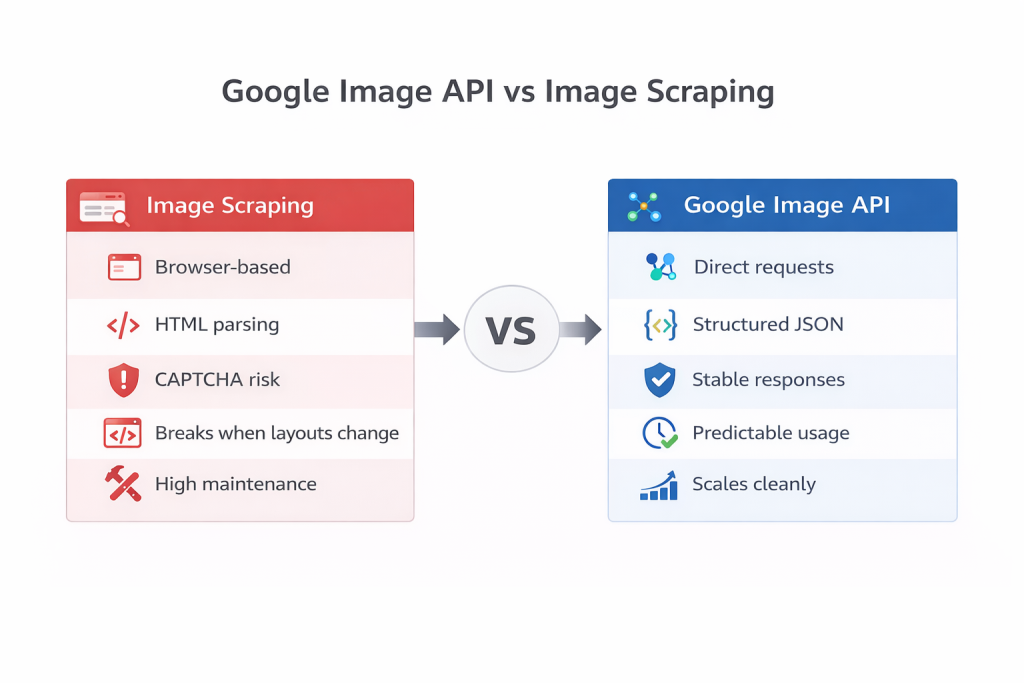
When someone needs image data from Google Images, there are usually two paths. One is using a Google Image API. The other is collecting data through image scraping.
On the surface, both seem to do the same thing. They fetch image results. But in real usage, they behave very differently. And once stability, cost, and long-term use matter, that difference becomes impossible to ignore.
What Image Scraping Actually Involves
Image scraping means loading Google Images the way a browser does and then pulling image links from the page code.
To make this work in practice, teams usually rely on headless browsers, proxy networks, and custom scripts that read and extract HTML. At first, this feels simple. There’s no signup, no plan selection, no official setup.
But this ease doesn’t last.
Google updates its image pages frequently. When layouts change, scraping scripts break. Images disappear, links stop working, or results quietly become incomplete. Fixing this isn’t a one-time task. It turns into ongoing maintenance.
On top of that, scraping systems often run into CAPTCHA checks, IP bans, rising proxy costs, and higher server load. For teams operating at scale, especially in the United States, scraping slowly becomes unstable and expensive.
How the Google Image API Changes the Picture
The Google Image API works in a very different way. It doesn’t deal with web pages at all.
Instead of loading pages, your system sends a request and receives structured data back. There’s no scrolling, no guessing, and no dependence on page layout. You get image URLs, source page links, basic image details, and proper result ordering in a consistent format.
Because the response structure remains the same, your system continues to function even when Google updates the visual appearance of images. This is why APIs are better suited for real products, tools, and platforms.
Legal and Safety Concerns
Scraping Google Images can violate usage rules, especially for commercial use. That creates uncertainty and risk for businesses.
APIs come with clear rules. You know what’s allowed, how usage is measured, and what behavior is expected. For companies working with clients or enterprise users, this clarity matters more than flexibility.
Data Quality Matters More Than People Expect
Scraped image data is often messy. Links break, metadata is missing, and the result order may not reflect real visibility.
The Google Image API returns clean, structured data that’s ready to store, compare, and analyze. This reduces complexity across the entire system and makes long-term analysis possible.

Common Google Image API Use Cases
The Google Image API becomes useful when image search stops being something you check once and starts being something your systems depend on. In real workflows, images are not just visuals. They act as signals that change over time and influence visibility, trust, and decisions.
This is where an image search API makes sense. It allows teams to collect image search data consistently and work with it at scale instead of relying on manual checks.
Below are the most common ways teams actually utilise the Google Image Search API in real-world systems.
Tracking Image Visibility Over Time
This is usually the first reason teams turn to the Google Image API.
Manual searches only show what appears right now. They don’t show trends. With an API, the same image searches can run on a schedule and results can be stored and compared across days or weeks.
Over time, this reveals patterns that manual checks miss. Teams can see which images gain visibility, which ones slowly drop, and when new images replace older results. This kind of insight is almost impossible to get without automation.
Monitoring Brand and Visual Presence
Brand visuals don’t stay where teams expect them to. Logos, product photos, and branded graphics travel fast. They show up on third-party blogs, marketplaces, resellers’ pages, and sometimes in places that have nothing to do with the brand itself.
Using image search data makes it possible to keep an eye on where those visuals end up. Instead of manually checking Google Images now and then, teams can run regular searches tied to their brand assets. That makes it much easier to catch misuse, duplication, or images being shown in the wrong context before the problem grows.
Because the data comes back in a structured form, this review doesn’t depend on someone scrolling through pages of thumbnails. The checks can happen automatically and consistently.
Supporting Product and Catalog Decisions
For product-driven companies, images aren’t decorative. They directly affect trust and buying decisions.
Teams often use image search data to see how their product visuals appear next to competitors in Google Images. Over time, patterns become clear. Some images surface consistently. Others disappear. Sometimes the wrong version starts ranking.
These signals help teams decide when images need to be updated, replaced, or standardized across listings. Instead of guessing why performance changes, they can see what’s happening visually and adjust with confidence.
Visual Research and Pattern Tracking
Not every use case is about marketing.
Some teams use Google Images data purely for research. By running the same image searches repeatedly, analysts can observe how topics, designs, or objects are represented across the web. As time passes, visual trends start to emerge.
Text alone doesn’t show this. Images do. And once that data is collected in a repeatable way, visual research becomes measurable instead of subjective.
Auditing Content and Image Indexing
Content teams also rely on image search data to verify how their published visuals are indexed.
By querying image results tied to their pages, they can confirm which images appear, which ones have dropped out, and whether outdated visuals are still showing up. This helps catch problems early, such as missing images, broken associations, or content that no longer reflects the page accurately.
Regular checks like this improve image optimization and content quality without forcing teams into constant manual reviews.
Automated Monitoring and Alerts
More mature setups move past observation and into automation.
With an image search API in place, systems can run scheduled checks, compare results over time, and flag changes automatically. Alerts can fire when new images appear, when rankings shift, or when key visuals disappear altogether.
At this stage, image search stops being something teams “check” and becomes part of an ongoing monitoring system.
Conclusion
The Google Image Search API changes how teams work with image search. Instead of treating it as a manual task, it turns image results into a structured data stream that systems can track and analyze over time.
This approach is far more stable than scraping and comes with clearer boundaries around usage and reliability. For teams that depend on image search data beyond one-off checks, using an API isn’t just more convenient. It’s the only approach that holds up as systems grow.
FAQs
What is the Google Image Search API?
The Google image search API allows developers to access Google Images results programmatically. Instead of viewing images in a browser, the API returns structured image data in JSON format, including image URLs, source pages, and metadata. This makes it possible to use image search results inside applications, tools, and automated systems.
Is the Google Image API the same as scraping Google Images?
No. Scraping involves extracting data from Google Images pages by parsing HTML, which is unstable and difficult to maintain. The Google Images API provides structured access to image search results without relying on page layouts or browser behavior, making it more reliable for long-term use.
What data does the Google Image API return?
The API typically returns:
➔ Direct image URLs
➔ Source page URLs
➔ Image dimensions and file formats
➔ Titles or descriptive text
➔ Pagination and metadata information
All data is returned in JSON format, which is easy to store and process programmatically.
Can I use the Google Image API for commercial projects?
Yes. The Google Image API is commonly used in commercial applications, internal tools, and SaaS platforms. However, teams are responsible for using the returned data in compliance with applicable terms, copyright rules, and usage policies.
google image api google image data api google image extraction google image results api google image search api google image search data google images api google images scraping google search api google serp api images Google visual search API image api for developers image scraping api image search api