
Table of Contents
Table of Contents
If you are building or running a web crawler, list crawling is one of the basic concepts you need to understand early. List crawling means visiting pages that contain lists of links, such as category pages, search results, or index pages, and then following those links to reach individual content pages.
Many people assume crawling is about collecting URLs one by one. In reality, most crawlers begin with list pages because they provide a structured way to discover a large number of pages without manually defining every link. When done properly, list crawling helps you find new pages faster, keep your crawl organized, and handle changes in site structure more easily.
Platforms like SERPHouse also rely on structured crawling strategies to collect and deliver search data at scale. When list crawling is implemented correctly, it becomes easier to discover new pages, maintain consistent crawl coverage, and adapt to changes in site structure.
This guide explains list crawling in a simple and practical way. It covers what list crawling is, how it fits into the crawling process, the common patterns you will encounter, and the mistakes that often cause issues. Whether you are setting up your first crawler or improving an existing one, this page gives you a clear starting point you can rely on.
What Is List Crawling?

List crawling is the practice of crawling pages that are designed to group multiple links together and using those pages to discover individual URLs efficiently. These pages are not the final destination. They exist to organize content.
You usually encounter list pages in places like:
- category and subcategory pages
- search result pages
- product listings
- job boards and directories
Instead of targeting every page manually, list crawling treats these pages as entry points. Each list page exposes a set of links that follow a repeated structure, making large-scale discovery manageable.
In most real-world crawling systems, list crawling happens early. It influences:
- which URLs get discovered
- how deep a crawler goes into a site
- How much duplicate or low-value data is collected
When list crawling is handled properly, the rest of the crawl becomes easier to control and scale.

How It Differs From Standard Web Crawling
Standard web crawling is broad and flexible. It focuses on fetching pages and following links as they appear, without giving special treatment to list-based structures. This approach works on small sites but starts to break down as websites grow larger and more complex.
List crawling takes a more deliberate approach. It separates discovery pages from content pages and treats them differently.
The key differences are simple:
- standard crawling follows links wherever they lead
- List crawling focuses on pages built to expose many links
- Standard crawling can drift into noise
- List crawling keeps discovery structured and predictable
By recognizing patterns such as pagination, repeated layouts, and consistent link placement, list crawling reduces missed pages and unnecessary requests. It does not replace general crawling, but it improves how crawlers discover and organize content at scale.
Why List Crawling Matters
List crawling matters because it changes how crawling decisions are made. Instead of reacting to whatever links appear next, it gives you a structured way to decide what should be crawled, tracked, or ignored. That difference becomes critical once a website grows beyond a few hundred pages.
In real projects, list crawling is often the layer that separates a crawler that “works” from one that produces reliable, reusable data over time.
Common Use Cases
List crawling becomes especially valuable when content is created, updated, or removed in large batches. In these environments, list pages act as the most reliable signal for understanding what exists on a site at any given time.
E-commerce catalogs
Large online stores organize products through category pages, filtered views, and paginated listings. These list pages surface changes before individual product pages do. By crawling them regularly, you can detect newly added products, identify items that are no longer available, and monitor pricing or stock shifts without re-crawling the entire catalog.
List crawling is commonly used here to:
- discover new product URLs as they appear
- track category-level changes
- avoid crawling discontinued or hidden products
Job boards and business directories
Job portals and directories are built almost entirely around list-based navigation. New entries are added constantly, while older ones expire or get updated. List crawling allows you to stay focused on what is current, rather than repeatedly fetching outdated pages.
In practice, list crawling helps with:
- identifying newly posted listings
- tracking updates to existing entries
- filtering out expired or duplicate records
Review platforms and content listings
Media sites, review platforms, and large blogs often organize content through lists such as archives, rankings, or category feeds. These pages provide a clear view of what has been published recently and what content is gaining visibility.
List crawling is useful here for:
- capturing newly published articles or reviews
- tracking updates to existing content
- maintaining structured datasets across large archives
Across all these scenarios, list crawling provides a consistent way to understand content movement at scale. Instead of guessing where changes happen, crawlers rely on list pages as a stable source of truth.
List crawling plays a major role in many automation workflows, especially in scenarios like SEO monitoring and large-scale discovery covered in our Google SERP API use cases.
Types of List Structures and Patterns
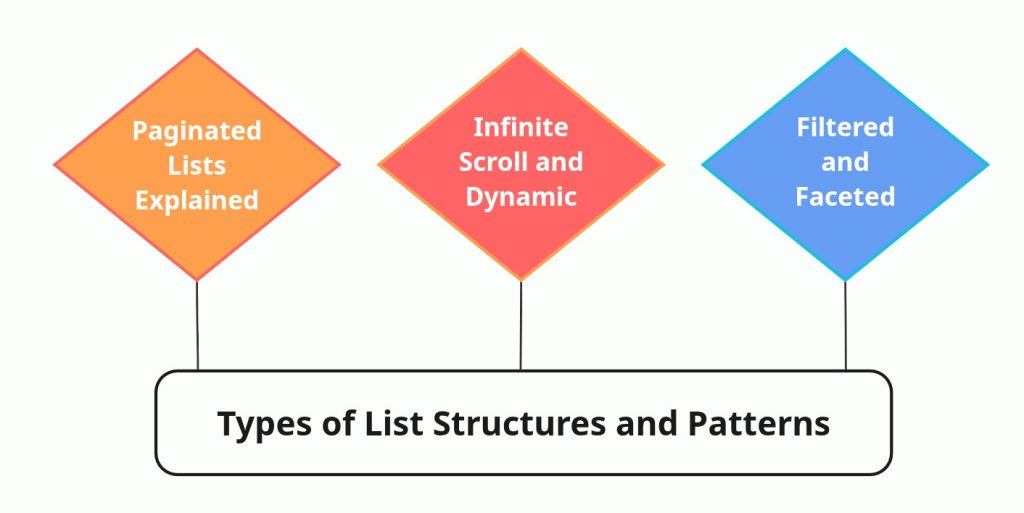
List pages may look similar on the surface, but the way they are built can change crawling behavior completely. The structure of a list determines how links are exposed, how far a crawler can go, and how reliably it can return consistent results. Treating all list pages the same usually leads to gaps, duplicates, or unnecessary crawl effort.
Most list-based websites rely on a small set of common patterns. Knowing how each one works makes a big difference when designing a crawl strategy.
Paginated Lists Explained
Paginated lists are the most straightforward type of list structure and still widely used across the web. Content is divided into multiple pages, with each page linking to the next set of results. This pattern is common in product categories, job listings, and article archives.
From a crawling point of view, pagination provides a clear and predictable path. Each page exposes a limited number of items and a direct reference to the next page in the sequence. This makes it easier to control crawl depth and understand when the list has been fully processed.
In practice, paginated lists work best when:
- page URLs follow a consistent pattern
- Navigation links clearly indicate the next page
- There is a defined end to the list
When these conditions are met, crawlers can move through large collections without guessing or relying on fragile logic.
Infinite Scroll and Dynamic Lists
Infinite scroll changes how list content is delivered. Instead of loading new pages, additional items appear as the user scrolls. While this improves user experience, it complicates crawling.
Most infinite scroll implementations rely on JavaScript and background requests to load new items. The initial page often contains only a small portion of the list, with the rest fetched dynamically. Crawlers that rely solely on static HTML will usually stop too early and miss a large part of the content.
With dynamic lists, the challenge is not discovering links, but understanding how the list expands. Crawlers need to identify the underlying requests that load additional items and determine when the list actually ends. Without this awareness, infinite scroll can quietly limit crawl coverage.
Filtered and Faceted Lists
Filtered and faceted lists allow users to narrow results by attributes such as price, category, location, or rating. These filters are powerful for users, but risky for crawlers.
Each filter combination often generates a new URL. On large sites, this can result in thousands of list variations that point to largely overlapping content. Some filtered views are valuable because they expose unique items, while others only create noise.
The key challenge with faceted lists is selectivity. Crawlers must decide which filters are meaningful and which ones should be ignored. Without clear rules, filtered lists can turn into crawl traps that consume resources without improving coverage.
Handled carefully, filtered lists can reveal important subsets of content. Handled poorly, they overwhelm crawling systems and reduce data quality.
Once URLs are discovered through list crawling, teams typically move into parsing and extraction as described in the SERP data collection guide.
Tools and Technologies for List Crawling
The tools you choose for list crawling should be driven by how list pages behave, not by popularity or feature count. A simple list does not need a complex setup, and a dynamic list will break if treated like static HTML. Matching the tool to the structure of the list is what keeps crawling reliable.
Rather than thinking in terms of “best tools,” it helps to think in terms of list behavior and crawl goals.
Simple Tools for Static Lists
Static lists are pages where the content is fully available in the initial HTML. Category pages, basic directories, and traditional paginated lists often fall into this group. These pages do not depend heavily on JavaScript and expose links directly in the markup.
For this type of list, lightweight crawling tools are usually enough. The goal is to fetch pages efficiently, parse links consistently, and move through pagination without unnecessary overhead. Using simple HTTP-based crawlers keeps crawling fast and easier to maintain, especially when dealing with large volumes of predictable pages.
Static list crawling works best when:
- links are present in the page source
- pagination follows a clear URL pattern
- list structure remains stable over time
In these cases, adding complexity rarely improves results and often slows things down.
Advanced Tools for Dynamic Content
Dynamic lists behave very differently. Content is often loaded through JavaScript, background requests, or API calls that only trigger after user interaction. Infinite scroll pages, filtered search results, and modern content feeds usually fall into this category.
Crawling these lists requires tools that can execute scripts, observe network requests, and respond to dynamic page states. The challenge is not just rendering the page, but understanding how the list expands and when it stops. Without that awareness, crawlers either stop too early or keep requesting data indefinitely.
Advanced tools are typically used here to:
- load content beyond the initial page
- detect underlying data endpoints
- handle scroll-based or event-driven loading
The tradeoff is higher resource usage, so these tools are best reserved for lists that truly need them.
Choosing the Right Tool for the Job
Choosing a list crawling tool is less about capability and more about restraint. The right tool is the one that solves the problem without introducing new ones.
A few practical considerations usually guide the decision:
- how the list content is delivered
- how often the list changes
- how much scale the crawl needs to support
Static lists benefit from speed and simplicity. Dynamic lists require flexibility and deeper inspection. Mixing these approaches without intention often leads to unstable crawls and unnecessary complexity.
Experienced crawling setups tend to use different tools for different list types, rather than forcing one solution to handle everything. That separation keeps crawling predictable and easier to adapt as sites evolve.
Step-by-Step List Crawling Workflow
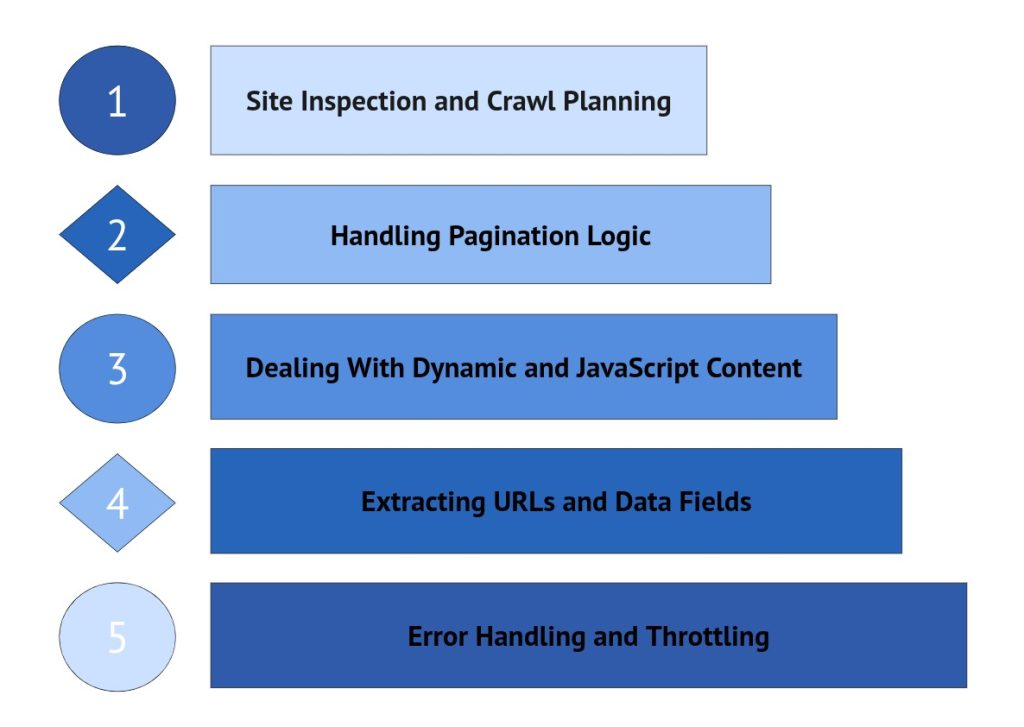
List crawling becomes reliable when approached as a deliberate process rather than a sequence of automated requests. Crawlers that perform well at scale usually follow a clear workflow, where each step builds on the previous one. This reduces instability, prevents unnecessary crawling, and improves the quality of collected data.
Although implementations vary, most successful list crawling strategies follow a similar progression.
Site Inspection and Crawl Planning
Effective list crawling starts with careful observation. Before configuring tools or defining logic, it is important to understand how the target website structures its list pages. Some lists are fully visible in the HTML, while others depend on pagination, filters, or dynamic loading.
At this stage, the objective is to identify patterns. Examining how links are presented, how pages connect to one another, and how content expands allows you to design crawling logic that matches the site’s behavior. Decisions made during inspection often determine whether a crawl remains stable or becomes fragile once scaled.
Handling Pagination Logic
Pagination defines how a crawler progresses through multi-page lists. While pagination may appear simple, websites frequently implement it in different ways. Page numbers, “next” links, and cursor-based navigation can all influence how additional results are accessed.
Reliable pagination handling depends on recognizing how new pages are referenced and understanding when the sequence ends. Without clear termination rules, crawlers risk missing pages or repeatedly cycling through the same URLs. Well-designed pagination logic keeps traversal complete, predictable, and free from duplication.
Dealing With Dynamic and JavaScript Content
Many modern list pages load content dynamically, often after scripts execute or user interactions occur. In these cases, the initial HTML may contain only a partial list, with additional items fetched in the background.
Handling dynamic lists requires awareness of how content is delivered. Crawlers must account for delayed loading, background requests, and interface-driven triggers such as scrolling or “load more” actions. Ignoring these mechanisms typically results in incomplete data and inconsistent crawl results across runs.

Extracting URLs and Data Fields
Once traversal through list pages is stable, extraction becomes the primary focus. List pages usually provide summary-level information that guides further crawling decisions. This often includes links to detail pages along with key attributes such as titles, prices, ratings, or brief descriptions.
Accuracy at this layer directly influences downstream processing. Clean URL extraction, consistent field mapping, and duplicate prevention help maintain dataset integrity. Errors introduced here tend to propagate throughout the crawl pipeline, making early precision critical.
Error Handling and Throttling
Even well-planned crawls encounter disruptions. Pages may fail to load, structures may change, and servers may respond unpredictably. Robust list crawling workflows anticipate these conditions rather than reacting to them.
Error handling strategies, retry logic, and controlled request pacing all contribute to crawl stability. Throttling, in particular, protects both the crawler and the target site by reducing the risk of blocking, rate limiting, or incomplete sessions. Systems that ignore these controls often struggle to maintain reliability at scale.
For projects focused on search engine data rather than raw HTML crawling, using a Real-Time SERP API often simplifies the pipeline.
Common Challenges and Solutions
List crawling rarely fails because of crawling logic alone. Most breakdowns happen when real-world website behavior collides with crawler assumptions. As websites evolve, defensive systems, structural changes, and traffic controls introduce friction that even well-designed crawlers must handle.
Understanding these challenges early helps prevent unstable crawls, incomplete datasets, and unnecessary debugging cycles.
Anti-Bot Defenses and CAPTCHAs
Many websites actively monitor automated traffic. When crawling patterns resemble bot activity, defensive systems may respond with CAPTCHAs, JavaScript challenges, delayed responses, or outright blocking.
These mechanisms are designed to distinguish human browsing from automated requests. Sudden spikes in request frequency, repetitive navigation patterns, or unusual header configurations often trigger protective layers.
In practice, stability improves when crawlers behave in a controlled and predictable manner. Gradual request pacing, realistic navigation flows, and consistent session handling reduce the likelihood of interruptions. When defenses cannot be avoided, crawlers must be prepared to detect and respond rather than repeatedly retrying failed requests.
Changing HTML Structures
List crawling strategies frequently depend on structural consistency. Even small layout changes can disrupt extraction logic, pagination handling, or link discovery.
Websites regularly update templates, redesign components, or modify class names without warning. Crawlers that rely on rigid selectors tend to break suddenly when these changes occur.
More resilient crawling setups account for this instability by validating assumptions continuously. Monitoring extraction accuracy, detecting unexpected layout shifts, and designing parsing logic with flexibility help reduce maintenance overhead. Structural change is not an exception in web crawling. It is an expected condition.
Rate Limits and IP Blocks
Traffic control systems are another common source of crawling friction. Websites often restrict request frequency or temporarily block IP addresses when activity exceeds acceptable thresholds.
Aggressive crawling can lead to throttled responses, incomplete page loads, or connection denials. These issues are especially common when crawling large lists or high-traffic platforms.
Sustainable crawling depends on controlled pacing. Limiting request rates, distributing traffic intelligently, and recognizing server-side signals help maintain crawl continuity. Crawlers designed for long-term operation prioritize stability over short-term speed.

Understanding Pagination & Dynamic Lists
List-style pages appear simple on the surface, but extracting data from them reliably requires understanding how the content is delivered. Not all lists behave the same way. Some rely on traditional pagination, others load dynamically, and many modern systems serve list data directly through APIs.
Because of these differences, successful list crawling is less about writing loops and more about choosing the right extraction strategy.
Below are the most common list patterns encountered in real-world projects.
Static Pagination (Traditional Navigation)
Static pagination represents the most predictable structure. Content is divided across multiple pages connected by “Next”, “Previous”, or numbered links. Each page typically follows a consistent layout and URL pattern.
From a crawling perspective, this model is straightforward. A crawler requests pages sequentially, extracts list items, and continues until pagination ends or no new data appears.
While stable, static pagination can become inefficient when deep page traversal is required, especially across large archives or product catalogs.
Infinite Scroll & Dynamic Loading
Modern interfaces often replace pagination with continuous scrolling. Additional items load only when the user interacts with the page, usually triggered by JavaScript events.
This pattern introduces challenges because:
- Initial HTML contains only partial content
- Data loads asynchronously
- Traditional HTTP requests may miss most items
Extracting complete datasets requires logic that simulates interaction or monitors when dynamic loading stops. Without this, crawlers frequently capture incomplete lists.
API-Based Extraction Using SERPHouse
When list-style data originates from search engines, SERPHouse removes the instability typically associated with crawling result pages. Instead of parsing HTML or detecting pagination elements, pagination is controlled explicitly through request parameters. Below is an example using a SERPHouse API approach (you would replace YOUR_API_KEY and the endpoint with real values from your SERPHouse docs).
Why This Approach Works
Unlike traditional crawlers, this method:
- Requests structured SERP data directly
- Controls pagination using the page parameter
- Stops automatically when results are exhausted
- Avoids fragile HTML parsing
Because SERPHouse delivers consistent JSON responses, extraction logic remains stable even when search engine layouts change.
After identifying target pages through list crawling, structured extraction can be automated with a Scraping API.
Summary and Next Steps
List crawling sits at the center of how structured websites are discovered and processed. While it may appear straightforward, the reliability of a crawl often depends on how well list pages are understood and handled. Pagination patterns, dynamic loading, filtering systems, and defensive mechanisms all shape how URLs are exposed and how consistently data can be collected.
Throughout this guide, we’ve looked at what list crawling means in practice, how different list structures influence crawling behavior, and why workflow design matters more than isolated tactics. The difference between a crawler that works temporarily and one that remains stable over time usually comes down to planning, structure awareness, and controlled execution.
If you’re applying these concepts, the next step is evaluation. Review how your target websites present lists, identify the structural patterns in play, and choose crawling strategies that match those behaviors. Small adjustments at the list-handling layer often lead to major improvements in crawl coverage, data accuracy, and system stability.
List crawling is not just a technique. It is a foundational part of building crawlers that scale without constant maintenance.